Skip to content

My Development Setup

I've been seeing a lot of these going around lately and thought it might be fun to write up my own. I have no idea if this is typical or super bizarre, but it has worked extremely well for me for the last few years.

Development Hardware

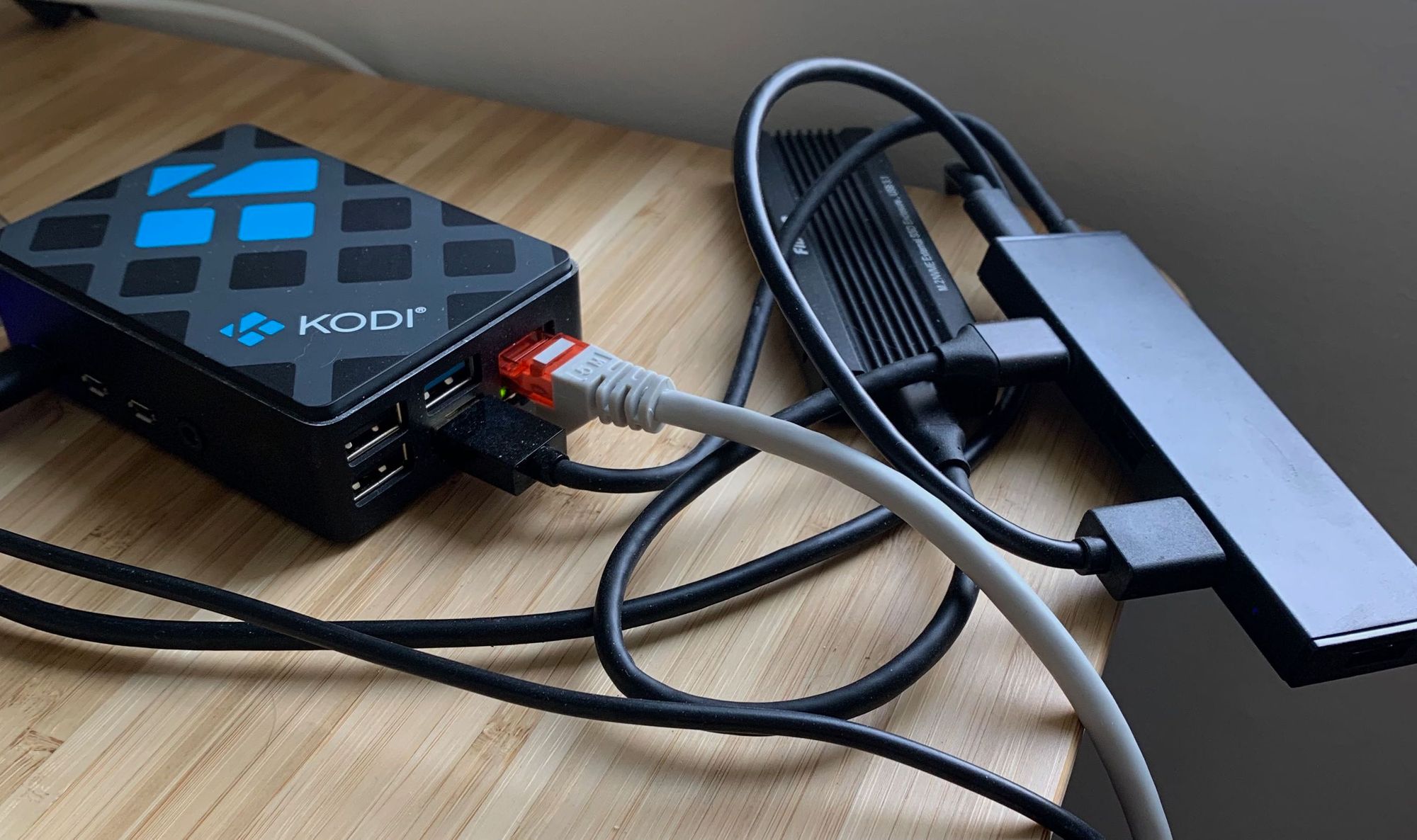
  • Raspberry Pi 4
  • KODI Raspberry Pi 4 Case: Link
  • Fideco M.2 NVME External Enclosure: Link
  • WD Blue SN550 1TB SSD: Link
  • Anker Powered USB hub: Link
Beautiful collection of loose wires

Traditionally I've been a desktop person for doing Serious Work ™ but most jobs have gotten rid of the desktop option. With the lockdown and remote work becoming the new normal, it's unlikely we are ever going back to a desktop lifestyle. However, the benefits for me of a desktop still remain, which are a stable target of hardware that lets me maintain the same virtual terminal for weeks or months, easily expandable storage and enough CPU and memory to let it sit unattended.

While the $75 Raspberry Pi 4 probably doesn't seem like it would fall into that category, it is actually plenty fast for the work I do with the exception of Docker. Writing Terraform, Python and Go is fast and pleasant, the box itself is extremely stable and with the new option to boot off of USB, I have tons of storage space and a drive that is work ready with lots of read/writes for me. While the Raspberry Pi 4 as my headless work machine started as a bit of a lark, it's grown into an incredibly useful tool. There are also a lot of Docker images available for the Raspberry Pi 4 out of the box.

Software

I know there are more options for Raspberry Pi OS than ever before, but I've stuck with Rasbian for a number of years now. A number of other folks swear by Ubuntu, but I've had enough negative experiences that I'm soured on that ecosystem. Raspbian has been plenty stable for development work, mostly getting rebooted for kernel upgrades.

I have no opinion on the merits of Vim vs emacs, I've only ever used Vim and at this point my interest in learning a new text editor is extremely low. Vim works reliably, never seems to introduce anything I would consider to be a shocking change in behavior. I understand that Vim vs NeoVim is really a conversation about community based development vs a single maintainer, but in general I don't really care until I'm forced to care.

If you are interested in learning how to use Vim, there are a ton of great resources. Vim itself has a tutorial but I've never seen newcomers get a lot out of it. For me Vim didn't click until I worked my way through the Vim Bible. In terms of hours saved in my life, working through that book might be one of the best decisions I ever made for my career. Easily thousands of hours saved. If you prefer a more practical tutorial I love Vim Golf.

  • Tmux terminal multiplier

I used Tmux a few hundred times a week and have nothing but good things to say about it. For those who don't know, Tmux allows you to have several terminal windows open and active at the same time, while still allow you to disconnect leaving them running. This means when I start working in the morning, I connect to my existing Tmux session and all of my work is still there. You can do things like run long-running scripts in the background, etc. It's great and you can get started using it here: Tmux tutorial.

  • Environmental variable management with direnv

I might be the last person on earth to discover this. For a long time I've been overloading my ~/.profile with all the different environmental variables needed to do my work. Since I spend a lot of time working with and testing CICD pipeline, serverless applications, etc, environmental variables and their injections are how a lot of application configuration is handled. Direnv is great, letting you dynamically load and unload those values per project by directory, meaning you never need to think if a program isn't working because you accidentally used the same environmental variable twice.

  • Manage my various dotfiles with chezmoi

Chezmoi is an interesting tool and one whose utility is so obvious that I'm shocked nobody made it before now. It's a tool that allows you to manage all of those various configuration files with git, a tool you likely use a hundred times a day anyway. Basically you add dotfiles to a repo with the chezmoi tool, push them to a remote repo and then pull them down again on a new machine or just keep them updated across all your various work devices.

None of this is too amazing if all it did was make a git repo, but it also includes tools like templates to deploy different defaults to different machines as shown here. It also does all the hard work to make secret management as easy as possible, integrating with my favorite password manager 1Password. See how that works here. With Chezmoi the time I spent customizing my configurations to match my workflow exactly is not time wasted when I switch jobs or laptops and I can easily write setup scripts to get a new Raspberry Pi or Raspbian install back to exactly how I want it without having to make something like an Ansible playbook.

I just started using Starship a few weeks ago, and I'm still not sure if I love it. Typically, this sort of stuff annoys me, overwhelming my terminal window with useless information. But I have to say the team behind this tool really nailed it.
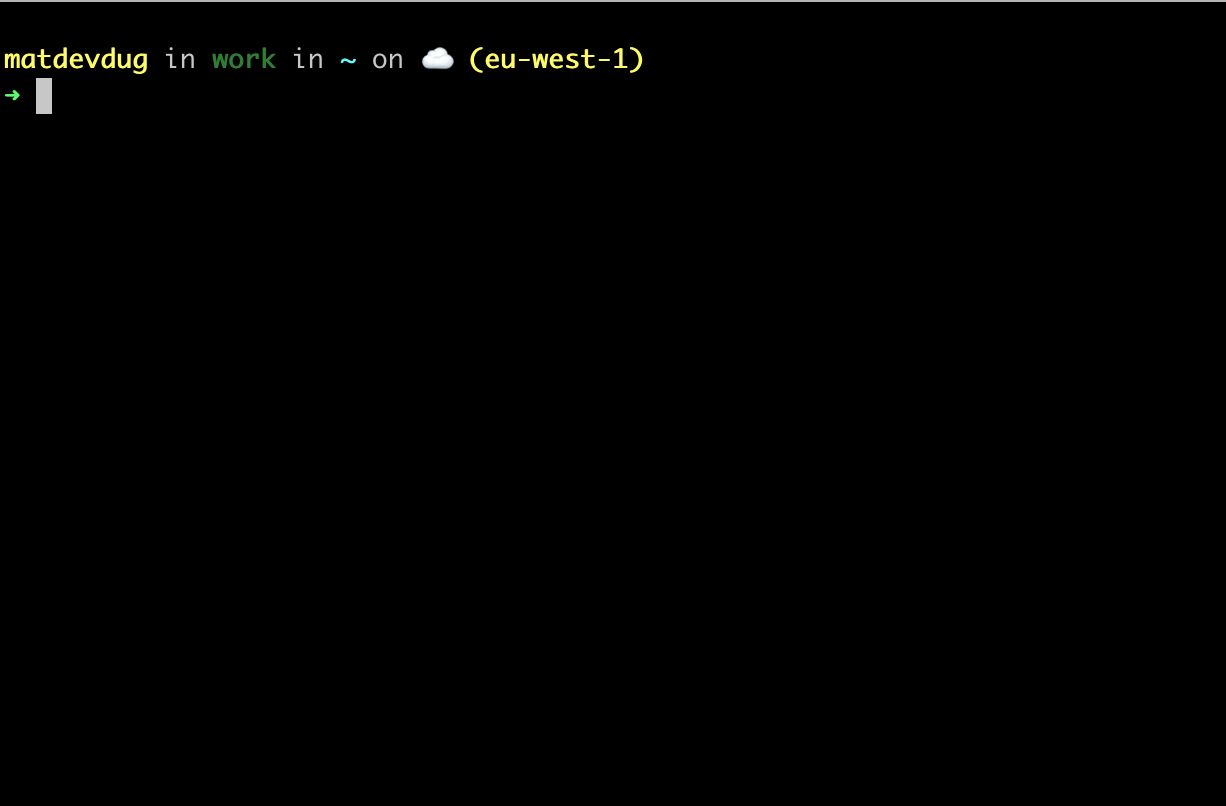
Very simple and easy to read

Without any configuration the tool understood my AWS region from my AWS Config file, told me my directory and otherwise got out of my way.

Even reminds me I'm inside of a virtual environment for python!

Inside a Git repo it tracked my git status, Python version for this project and even let me set a fun emoji for Python which definitely isn't required, but I also don't hate. One problem I ran into was not showing emojis by default correctly. I solved this by installing this font and setting it to be my font in iTerm. However, if that doesn't work Starship has more troubleshooting information here.

I use SSH all the time, my keys all have passphrases, but I hate entering them a million times a day. Keychain manages all that for me and is one of the first things I install.

If you write in a language where you want to trigger some action when a file changes, entr will save you from rerunning the same six commands in the terminal a thousand times. I'll use this constantly when writing any compiled language.

Moreutils is a collection of tools that you would think came out of the box. Tools like sponge which write standard input to a file, isutf8 which just checks if a file is utf8 and more. I use sponge on a weekly basis at least and love all these tools.

CLI tool to work with PDFs. I've used this in serious business applications all without issue for years. Lets you combine/modify PDFs in shell scripts.

I work with Git and GitHub all day every day. Hub lets me do more with GitHub, almost everything I would normally do through the web UI through the terminal. While I like GitHub's interface quite a bit, this just saves me time during the day and keeps me from breaking out from my task and get distracted from what I'm doing. For GitLab users this seems to be roughly the same: link

When you work with web applications in Docker, you spend a lot of time curling to see if stuff is working. I use this for healthchecks, metrics endpoints, etc. So imagine my pleasure at discovering a nicer to read curl with httpie. With options like --session= which lets you simulate having a consistent session and --offline to simulate the request without sending it off. I use this tool all the time.

I use man a lot with my command line tools, but sometimes I don't want to get into all the millions of options a tool has and just want some examples of commonly used things. For that, tldr can save me some time and tealdeer is a very nice interface for those pages.

Datamash is one of the weirder tools I use. Basically it allows you to run operations against txt files and sometimes do analysis of those files even if the format is messed up. I'm not exactly sure how it works, but sometimes it really saves me a ton of time with stranger files.

If you work locally with remote APIs, get ngrok. It handles all the tunneling for you, allowing you to simulate basically having a publically available server on your local laptop. It has revolutionized my workflow and I cannot recommend it highly enough.


TIL Command to get memory usage by process in Linux

If like me you are constantly trying to figure out using a combination of ps and free to see what is eating all your memory, check this out:

ps -eo size,pid,user,command --sort -size | \
    awk '{ hr=$1/1024 ; printf("%13.2f Mb ",hr) } { for ( x=4 ; x<=NF ; x++ ) { printf("%s ",$x) } print "" }' |\
    cut -d "" -f2 | cut -d "-" -f1

TIL docker-compose lies to you....

You, like me, might assume that when you write a docker-compose healthcheck, it does something useful with that information. So for instance you might add something like this to your docker-compose file:

healthcheck:
      test: ["CMD", "curl", "-f", "-L", "http://localhost/website.aspx"]
      interval: 5s
      timeout: 10s
      retries: 2
      start_period: 60s

You run your docker container in production and when the container is running but no longer working, your site will go down. Being a reasonable human being you check docker-compose ps to see if docker knows your container is down. Weirdly, docker DOES know that the docker container is unhealthy but seems to do nothing with this information.

Wait, so Docker just records that the container is unhealthy?

Apparently! I have no idea why you would do that or what the purpose of a healthcheck is if not to kill and restart the container. However there is a good solution.

The quick fix to make standalone Docker do what you want

  image: willfarrell/autoheal:latest
  restart: always
  volumes:
    - /var/run/docker.sock:/var/run/docker.sock
  environment:
    - AUTOHEAL_CONTAINER_LABEL=all
    - AUTOHEAL_START_PERIOD=60

This small container will automatically restart unhealthy containers and works great. Huge fan.


GRADO SR80e Headphone Review

The Best Headphones I've Ever Owned

I'm pretty new to the whole audiophile world. It wasn't until I started working in an open office in Chicago that the need for headphones became an obsession. One concept I've run across a lot is the idea of "endgame headphones", which are presumably the last headphones you'll ever need to buy. I don't know if the SR80e's are that, but they're damn close.

Wait, who the hell is Grado?

Don't be embarassed, I also had no idea. As someone who spent years going through Apple headphones, I'm far from an audiophile. It turns our Grado is a fasinating business. They are a US-based family business, based in south Brooklyn and you would have no idea what you were looking at if you drove by.

They've been making the real deal since the 50s and for the audiophile community and started out making phono cartridges for turntables. I strongly recommend reading through their company timeline which they've put on their website in a easy to read scrolling page. You can find that here.

What's not to love about a global HQ like this?

Packaging

The SR80e came in one of the strangest packages for electronics I've ever seen. I bought it from Amazon and got a very nice but extremely flimsy cardboard box with the headphones. It didn't bother me, but I am glad I bought a carrying case. This is the one I ended up with.

This is minimal packaging at its best. You get: Headphones, Warranty, Grado story-sheet, 6.5mm Golden Adapter and that's it. So if you need anything more, make sure you buy it. I recommend a DAC at the very least, which I'll have a review up later about the ones I tried. One surprising thing was the headphones are made in the US, which shocked me at the $99 price point.

Fit and Feel

First impression is these headphones remind me of my dads ancient hifi gear. They feel solid, with a nice weight that is good to pick up but isn't too heavy on the head. The headband adjusts nicely to my head and the cord is remarkably thick, like industrial thick. There is something incredible in this modern age of aluminum and glass to having something that feel retro in a fun way. Throwing it on the scale, it weighs about 235 g without weighing the cord. I found these a lot more comfortable to wear when compared to the AirPods Max I tried around the same time that weigh in at 385 grams.

The best way to describe these headphones is "professional grade". They feel like they could last for years and I have no doubt I could use these daily with no problems. The foam ear cushions are comfortable enough and I love that they are replaceable for when I wear them out in years. There are no bells and whistles here, no mic or anything extra. These are designed to play music.

I love the grill mesh look that lets you see the drivers. The ear cups are fully rotatable and you get the sense that if you needed to break these open and soldier a wire back, you could. The sturdy design philosophy extends to the cable, which clocks in at an extremely long 2m or 7 ft. However Apple designs their incredibly terrible cables, Grado does the opposite with thick cables and durable straight relief at the jack.

Sound Quality

These are some of the best selling headphones in the "beginning audiophile" section of websites and once you start listening to them, you can tell why. I don't "burn in headphones" because I think its junk science, I think you just get used to how they sound which is why people report an "increase in quality". Most of the headphones I've owned have had some sort of "boost" in them, boosting either the bass or the midrange.

It's hard to explain but this makes music sound "correct". There's a smoothness to the sound that reveals layers to music that I have not experienced before.  I've always been suspicious of people who claim they could instantly tell the quality of speakers or headphones with music, mostly because sound feels like a very subjective experience to me. But when relistening to old favorite albums I felt like I was in the studio or listening to them live.

Common Questions about Sound:

  1. Are they good for an open office or shared working space? No, they're open-back headphones which means everyone will hear your music.
  2. Are these good for planes? No, they have no sound isolation or noise cancellation.
  3. What kinds of music sound awesome on these? I love classical music on these headphones along with rock/alternative that has vocals. EDM was less good and I felt I needed more bass to really get into it.

Should I buy them?

I love them and strongly recommend them.


Download Mister Rogers Neighborhood with Python

A dad posted on a forum I frequent in Denmark asking for some help. His child loves Mister Rogers, but he was hoping for a way to download a bunch of episodes that didn't involve streaming them from the website to stick on an iPad. I love simple Python projects like this and so I jumped on the chance. Let me walk you through what I did.

If you just want to download the script you can skip all this and find the full script here.

Step 1: Download Youtube-DL

My first thought was of youtube-dl for the actual downloading and thankfully it worked great. This is one of those insanely useful utilities that I cannot recommend highly enough. You can find the download instructions here: http://ytdl-org.github.io/youtube-dl/download.html

Step 2: Install Python 3

You shouldn't need a super modern version of python. I wrote this with Python 3.7.3, so anything that number or newer should be good. We are using f strings because I love them, so you will need 3.6 or newer.

Download Python here.

I'm checking the version here but only to confirm that you are running Python 3, on the assumption that if you have 3 you have a relatively recent version of 3.

version = platform.python_version_tuple()
if version[0] != "3":
    print("You are not running Python 3. Please check your version.")
    sys.exit(1)

Step 3: Decide where you are going to download the files

I have my download location in the script here:

path = "/mnt/usb/television/mister-rogers-neighborhood/"

However if you just want them to download into the Downloads folder, uncomment the line above this one by removing the # and delete the line I show above. So you'll want path = str(Path.home() / "Downloads") to not have a # in front of it.

Step 4: Run the script

Not sure how to run a Python script? We got you taken care of. Click here for Windows. Here are some Mac tips.

You can find the script on Gitlab here: https://gitlab.com/-/snippets/2100082

Download the script and run it locally. The script checks if it is the first or third Monday of the month and only runs the download if it is. This is to basically keep us from endlessly spamming the servers hosting this great free content.

The first Monday of every month will feature programs from the early years 1968-1975. The third Monday of every month will feature programs from the “Theme Weeks” library 1979-2001.

NOTE: If you just want to download 5 episodes right now, delete these lines:

today = date.today().isocalendar()
if today[2] == 1 and (today[1] == 1 or 3):
    logging.info("There is a new download available.")
else:
    logging.info("There are no new downloads today.")
    sys.exit(0)

Step 5: Set the script to run every day

This script is designed to be run every day and only go out to the servers if there is a new file to get.

Here is how to run a python script every day on Windows.

For Linux and Mac open up your terminal, run crontab -e and enter in the frequency you want to run the script at. Here is a useful site to generate the whole entry.

File Formatting

Here is the metadata formatting I followed for the Infuse iOS app, my favorite app. You may want a different format for the filename depending on your application.

Questions?

If people actually use this script I'll rewrite it to use celery beat to handle the scheduling of the downloads, but for my own use case I'm comfortable writing cron jobs. However if you run into issues running this, either add a comment on the GitLab link or shoot me an email: mat at matduggan.com.


Free DS-82 Fillable PDF Download

While working on my passport renewal, I realized the US Government official PDF isn't set up as a form. I googled it and it seemed like nobody had made one of these available for free that I could find. Just a lot of spammy websites trying to get you to pay or make an account to access the form. Anyway, for those of you looking for just a simple PDF download of the form with all the fields set up correctly:

US Government DS-82 Fillable PDF


Stuff To Buy: American Expat Edition

One of the more common questions I hear get thrown around expat groups is "what should I buy before I move" or "what should I send to a loved one who is currently living in Europe". While I am not an expert on what is available everywhere in Europe, here are some things I miss in Denmark and likely are hard for most expats in Europe to get. Hopefully this helps you pack or buy some great gifts.

  • American Plastic Food Wrap - Denmark has this stuff, but the domestic stuff is terrible compared to the American version. I have no idea why, I assume some sort of super dangerous chemical. Anyway buy it.
  • Taco Seasoning - I have no idea why, but the stuff they have here is terrible. It has almost no flavor except for salt.
  • Twizzlers - If you like them, buy them because you can't buy these in Denmark.
  • Poultry Seasoning - mostly for Thanksgiving but you can't buy that here.
  • Cream Of Tartar
  • Good Doritos - they have some Doritos but they don't have any of the good flavors, so no cooler ranch or nacho cheese.
  • Everything Bagel Seasoning - honestly there aren't a lot of bagel places, but this seasoning goes great with everything
  • Aspirin
  • Pepto-Bismol
  • Tums
  • Melatonin
  • Corn bread
  • Grits / pancake mix - you can find it but it costs 5x what it should
  • Maple Syrup is available but only the expensive real stuff
  • Old Bay
  • Peppers! Spicy food doesn't exist in Europe like it does in the US. The only stuff you can get here is like tobasco sauce and red pepper flakes. So get some guajillos, puyas, chiles de árbol with the stems if you can find them.
  • The best hot sauce on the planet.
  • Greenies for your dog.
  • Cheap Dog Poop Bags
  • Mac and Cheese Powder - no Kraft Mac and Cheese here.
  • Electronics - all electronics because the tax for things like laptops/headphones/game consoles is insane in Europe compared to the US
  • Peanut Butter - you can buy it but it is a lot more expensive
  • Meatloaf Mix
  • Vanilla Extract - lots of vanilla beans at the grocery stores but no extract
  • Sprinkles
  • Pretzels
  • Goldfish crackers
  • Ginger Ale (they have ginger beer)
  • Root Beer

RG300 Review

A surprisingly good value for retro-gamers of all ages.

The Good Old Days

Retro gaming as a hobby has exploded in the last ten years, as gamers turn away from modern releases and return to the games of their childhoods. With less complicated systems, familiar art and music styles and stories that were famous among kids our age, retro gaming has become a much more legitimate hobby. Part of the appeal for me is the depth by which you can get obsessed with the hardware, trying to squeeze every drop of nostalgia out.

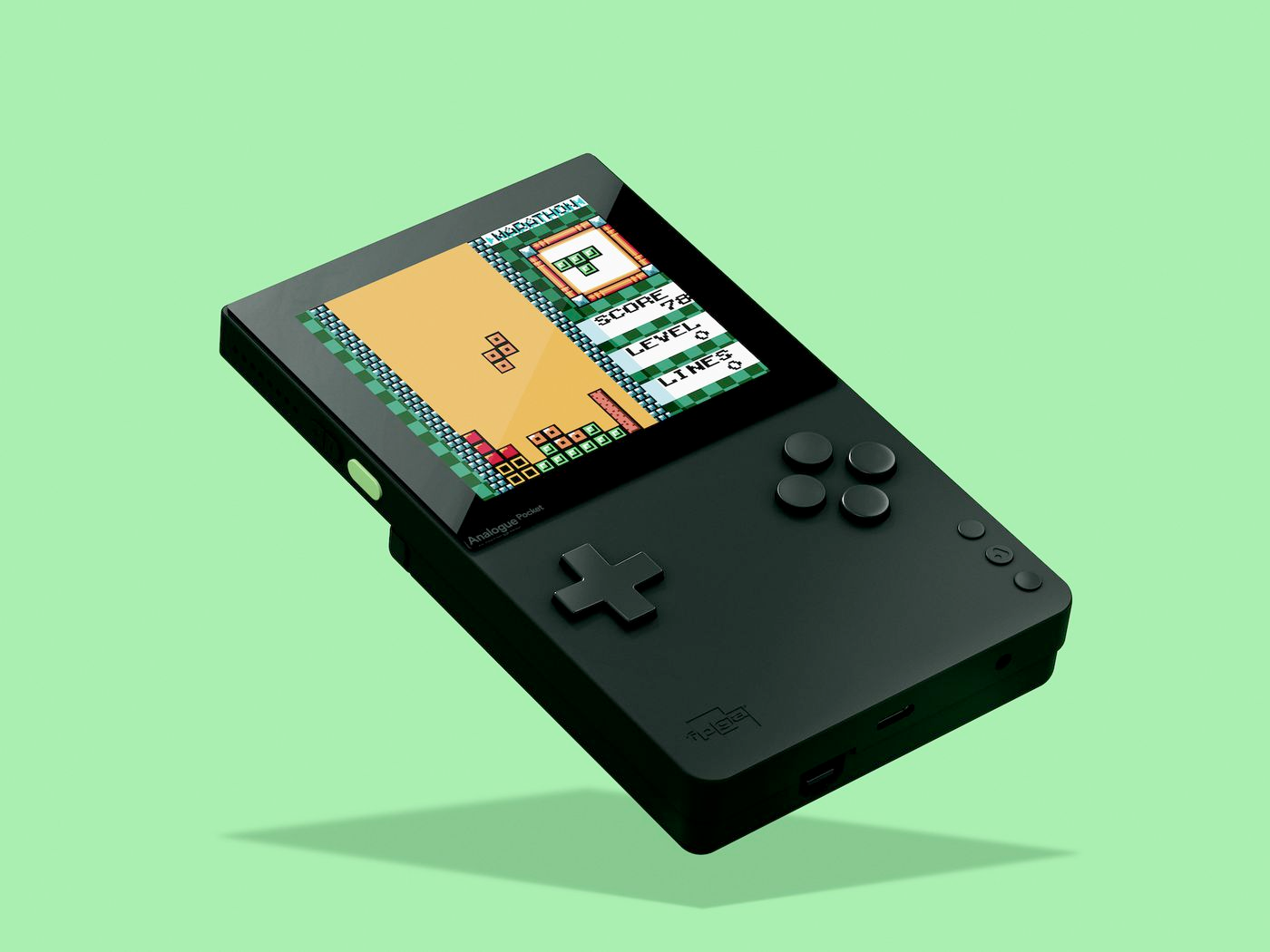
The idea of a retro handheld device was new to me until the Analogue Pocket. This incredible looking fusion of the Gameboy of my past with the power and convenience of modern systems blew my mind. I had long coveted one of the Analogue retro consoles. They are famously based on Intel FPGAs which, when loaded with "cores" allow for a copy of old gaming chipsets.

FPGAs?

A FPGA, or field-programmable gate array, is a really fascinating piece of technology. So most things you interact with that have computer chips in them have integrated circuits in them. You've seen them in every piece of electronics you've dropped on the floor and seen fly across the room. Game consoles historically used these to make their machines and add specific functionality to them.

For a long time it has been possible replay classic games on modern computer hardware, but all this conversion has happened on something called an emulator. Emulators work by recreating in software what used to happen in hardware between the behavior of processors and systems like the sound or graphics chips. Basically given the advances in computer speed we had enough overhead to recreate how those old systems used to work.

It's important to note that for many of these older game consoles, the machines continue to work but we're running out of things to connect them to. Converting the analog signal to HDMI to connect them to a modern television is not as simple of a task as it seems. If you happen to still have your old console and games and want to play them now, your basically have three options:

  • Buy a RAD2 cable
  • Get a CRT television and stick it somewhere in your house.
  • Buy a device that can play the old cartridges but plug into your modern television.

Why Does It Matter?

Well it kinda doesn't. See above when I was talking about how retro gaming is becoming a hobby as much about the journey as the destination. The reality is there are a ton of ways to play old games through emulation that human beings would struggle to tell the difference with, but the gold standard has been and continues to be the FPGA machines.

Analogue is sort of alone out there making these machines and they have become the high end headphone/audiophile version of classic gaming. They've made NES, SNES, Genesis and it seems finally they've turned their attention to the portable market. This is the device I wanted to desperately buy:

The Pocket runs a pair of FPGAs handling a variety of duties. The primary FPGA appears to be the Altera Cyclone V FPGA, with the secondary Altera Cyclone 10

However they're impossible to get as you can tell from their website here. So since I can't get the real thing, I thought "let's try one of these emulators". I have to say, I have been really impressed with the RG 300. For software based emulation on a portable, less powerful platform, it has been a mostly positive experience.

RG 300 Appearance

The RG 300, or retro-gaming 300, looks something like the Gameboy of my youth if you didn't look at it very hard.

It costs a fraction of the Analogue Pocket, with the Pocket coming in at an intimidating $199 and the RG 300 squeaking in at $50. I purchased mine from Retromini and have absolutely nothing exciting to say about the process. The shipping was fast, everything showed up in good condition and it worked as expected with a few exceptions we'll get into later.

The buttons are excellent quality, with a very satisfying click when you press down on them. The shoulder buttons on the back are the best of all of them, with a feeling very similar to a mouse button click. This is actually due to them using the same switches as a gaming mouse, but I wish more games took advantage of these rear switches. The front button are good, with a great feeling D pad. The only complains I have about controls are the weird coloring and font choice for the X Y A B buttons.

For some reason they remind me of Xbox 360 buttons, which isn't really a bad thing but it is unusual. They're also kind of loud buttons, which doesn't seem to bother anyone in my household. Other than the buttons on the front you have a power slide button on the left side, a volume button on the right side and a headphone port on the bottom. The two small buttons in the middle control the brightness of the screen with the top one, and emulator configuration options with the bottom.

RG 300 Screens

I got the 3.0 inch IPS display with tempered glass and I'm in love with it. Games look crystal-clear, I haven't had any scratches even carrying it my coat pocket with other junk in there. The resolution is 960*480 which is plenty big for the games I'm going to play. You have control over brightness with the top small button in the middle of the front and I find it plenty bright even at 25% for normal gaming.

Internals

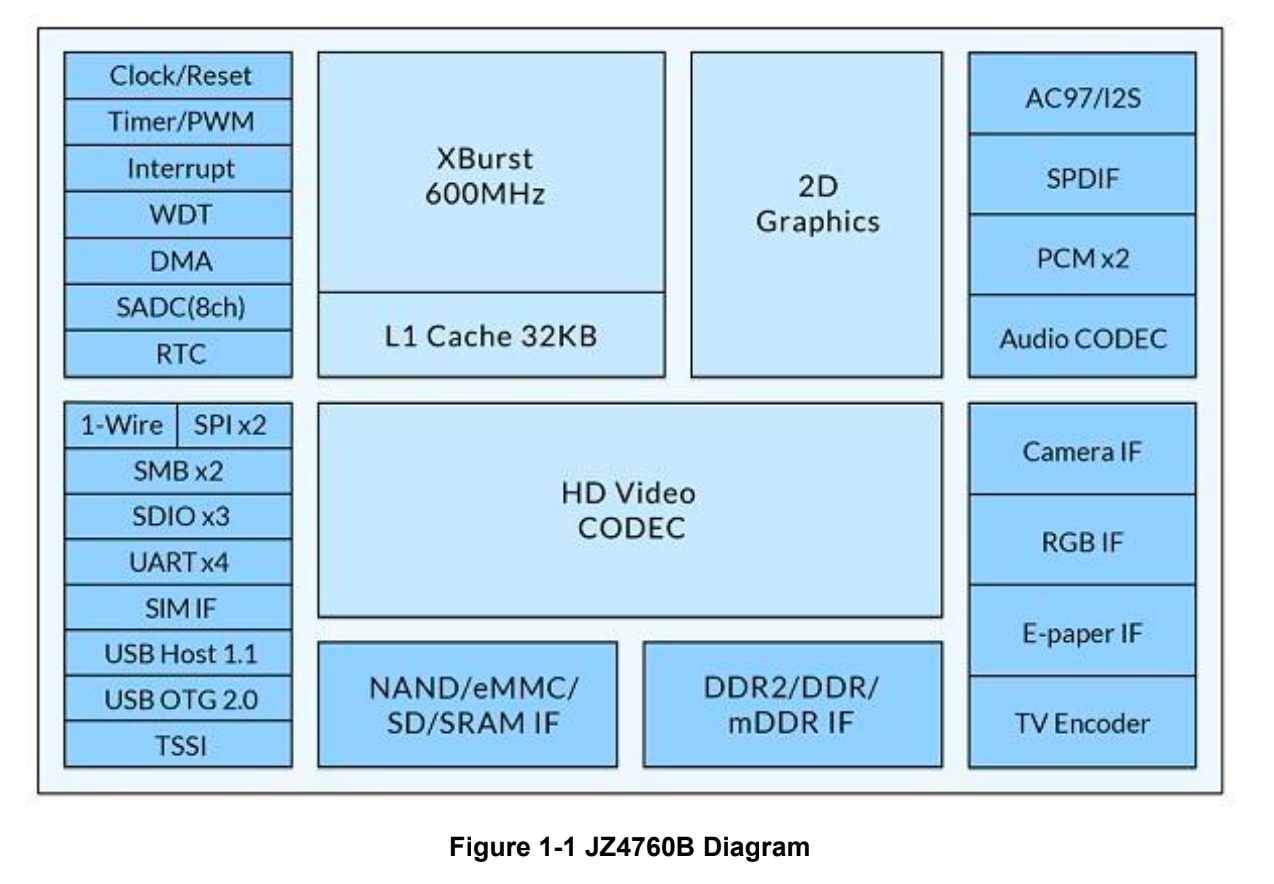
The RG 300 runs RetroFW, an open source firmware that seems to power all of these sorts of devices. In the portable emulator world if you have more CPU, you tend to run Android and one of the many emulators available for that. If you don't, which definitely includes the RG 300 with its JZ4760B chipset clocking in at a screaming 528Mhz with 2 cores, you run RetroFW. I had never heard of this chipset before now but it is an interesting piece of technology.

Despite its clock speed the JZ4760B is a formidable chip for not a lot of money. The CPU core is the XBurst processor engine along with a VPU and support for a variety of flash memory.

For those of you interested in this fascinating chipset, you can get more information here.

In terms of running RetroFW, its very fast. The device boots up almost immediately but unfortunately doesn't keep state. So if you are in the middle of playing a game, then flip the switch to turn it off and then turn it back on later, you aren't going to be back where you where. This is probably the worst part of the RG 300 experience, which is state management.

Classic game consoles are famous for "hit the power button and start playing". The RG 300 does have this experience when the device goes to sleep, which is what happens if you leave the device running and walk away from it. By default I believe it goes into "suspend mode" after 10 minutes of idle, but this is configurable in the settings. However when you hit the power toggle, you are basically exiting out of everything and when you return, you are back on the home screen. It's annoying.

While my version of RetroFW was pretty recent, I wasn't on the latest version of the firmware. Thankfully flashing the RetroFW was pretty simple. If you remove the battery cover on the back, you'll see a MicoSD card which contains the firmware and everything else.

I took this SD card out and taped it to the back of the battery cover. Generally I've had bad experiences with no-name MicroSD cards and I'd prefer to keep the original factory one untouched in cased I caused serious problems. The RG 300 actually has 2 SD card slots, one in the side and one behind the battery. I ended up going with a 16 GB behind the battery with the RetroFW firmware and the emulators, reserving an 8 GB in the side for content. However you can do whatever you want.

Flashing the new version of the firmware is quite easy.

  1. Take the card out from behind the battery (the battery just pops out), and either store it somewhere safe or at least copy the contents to a folder.
  2. Find out which RG 300 you have. There is a "Dim Screen", a "Bright Screen" and an IPS screen. If you purchased from my link above, you have the IPS screen and if you are considering buying one today in 2021, you should only be considering the IPS screen.
  3. Download the firmware here: GitHub
  4. Assuming the MicroSD card you are going to use is still attached to your computer, download Etcher. Follow the steps to flash your MicroSD card with the new firmware.
  5. You still need to download emulators. Once the card has been flashed you'll see it get mounted on your computer. You'll see a variety of directories here. Download the emulators you want from this list, put them in a top-level directory on the SD card (like data or opk) and then put the SD Card into your RG 300 and boot it up. If you scroll up to the top there are specific instructions to get the system to see the emulator depending on what kind of emulator you have downloaded.

Wait, this is too technical for me.

Don't stress, you don't need to do any of this to start playing. The RG 300 has everything you need already installed, so if this isn't for you just boot it up and start to play. I'll leave it up to other websites to tell you where to find software but there are a variety of nice open-source games on the platform you can play right away with no copyright concerns.

RetroFW Performance on the RG300

For this sort of thing you really need a video and unfortunately I'm not really interested in making one. I found this one excellent though.

RG 300 Battery Life

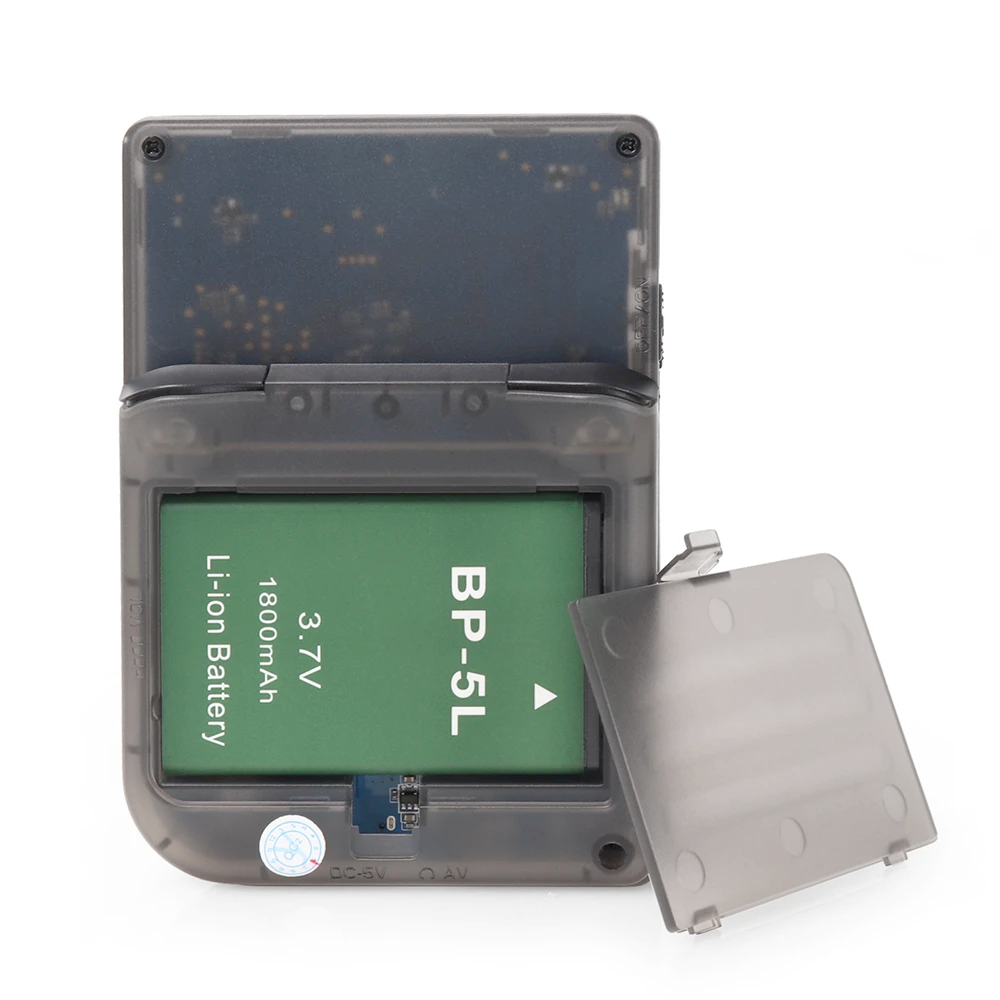
In my experience I get about 5 hours of battery life, but there is something really strange about the RG 300 battery. On it is printed BP-5L:

The BP-5L is a type of battery, but it isn't this battery. I have no idea why it has this printed on it. If you need a replacement battery, the kind of battery you want to buy is a BL-5B. Here is a bunch of eBay listings for them here. I don't know why it has the wrong label on it, but at least you know now.

Charging is done through the USB-C port on the bottom. I was surprised to see USB-C on a $50 device and the cord that comes in the box works well for charging and transferring data. You can play while you charge, but if you end up using the USB-C to transfer content (for instance, if you don't have a second MicroSD card) and charging, you'll end up having to select what you want the connection to do every time you boot up.

Conclusion

The RG 300 is an amazing device to hold you over until Analogue makes more of the Pocket, if they ever do. I was very surprised at how well put together this device is, expecting something that felt a lot more cheap at this price point. Comparing games between my Gameboy Advance SP and this, I felt the RG 300 was virtually identical as far as my eyes could tell.

It has become my most used device and one that I've really started to look forward to enjoying on the train or bus. It is so good, I'm not sure I'm going to buy an Analogue Pocket anymore, which is surprising to me considering my level of enthusiasm. Strongly recommend picking one up, especially at the $50 price point.

FAQ

  • How do you get cheats onto the system for Gameboy Advance games?

This is surprisingly confusing, but I'll walk you through how to do it. So first not all the Gameboy Advance emulators support cheat codes. You want to ensure you have the gpSP emulator installed. When it is installed, you will get at the top level of your SD card when you plug it in a directory called .gpsp.

This is not where your games go and a lot of instructions online tell you to place the cheat files with your games. This doesn't work. What you want to do is: make a file with the EXACT SAME NAME as your game, ending in a .cht extension. Then, take the file and put it into this .gpsp directory. Now because this is a . directory, it will be hidden by default from Mac and Linux users. For Mac hold down: cmd + shift + [.] (that is just the period sign) to see the hidden holder. Put the files here and you are good to go.

Here is a download of several hundred CHT files to get you started. Remember you need to change the name to exactly what the game is called in your system, put them in the .gpsp directory, then hit the emulator option button (second small button from the top) and enable the cheats you want. If you want more cheats then this is the site you want.

  • Does charging work from a USB-C charger?

In my testing it does not, presumably from lack of USB PD negotiation capabilities on the chipset. So weirdly you need to use a USB-A -> USB-C like what comes in the box. I don't know why they bothered to include the USB-C port if it doesn't negotiate power from USB-C chargers, but just be aware you can't take this thing on a trip if you don't have a USB-A charger somewhere.


Tips and Resource for New DnD 5e DMs

Welcome to the show!

Being a DM is one of the more rewarding things you can do in the gaming space. It is the only opportunity I've ever had to truly create anything I want. After some time DMing you will struggle to enjoy videogames the same way, longing for the same levels of creative freedom. On the other hand, the pressure has never been higher.

Running a game can be very daunting for folks not used to it, so I thought I would put together some resources I've found extremely useful over the last 12 months of DMing. I'll try to update this post with new information as I find it.

Basic Starter Kit

Starting Out

Once you have all that, sit down and read through all of the basic rules. Feel annoyed and overwhelmed? Welcome to being a DM at first. Power through and then take a break and listen to a podcast.

  • https://www.jointhepartypod.com/ is a well-made DnD 5e podcast that explains all the rules as they go. This means you will get an explanation for what the characters did and why the GM did what they did.

After listening to the rules and the first 10 episodes of Join the Party, you are almost ready to start DMing. Here are some mistakes I made and what I should have done, so you don't make the same errors.

  • Don't let players roll their own characters at home. Make them do it in front of you because even otherwise good people tend to fudge some numbers and make some statistically unlikely characters.
  • Ask people to stick to classes and races in the PHB, or the players handbook, at first. This reduces the number of things you'll need to account for as a new DM and also prevents players who enjoy creating super-powered characters from taking too much advantage.
  • Do a few practice sessions of combat where you alternate between being the DM and being the player. It'll get you more experienced with combat.
  • Spells work under more complicated rules, so try a few of those out as well.
  • Have a session 0. This is where you all meet, chat about what you expect from the game and what you like. Here are some things you are going to want to discuss before you start playing together:
* Do you like exploration, combat or role-playing? See what parts of DnD your particular group likes    

* How important is following the rules vs keeping the flow going? You are going to have to make judgement calls in the middle of games that might not be right or consistent with the rules. See if players are ok with this.     

* Do you care if we do a custom campaign vs pre-written adventures? At first you'll want the security of the pre-written stuff

Post Session-0

Alright you professional DM, you are out there rocking and rolling, going through some pre-written adventures. Hopefully you are getting the hang of combat encounters and figuring out what parts of DMing you like vs which are a chore. For me I hate combat but love improv storytelling, where I try to say yes to the player whenever I can and build on top of their responses. But everyone is different.

Here are some things you will want to start to think about as you master the basics and begin to feel more comfortable in the chair:

  • Do you want to roll in front of players or behind the screen? This is a style decision and one I encourage people to think about. Rolling in front of players can be exciting since you also don't control what happens, but you need to be ok with what might happen as a result.
  • Start to add more flavor to your scenes. Maybe instead of "the sword misses" it "embeds itself into the stone". The more layers you start to add to the world, the more your players will get invested.
  • Don't be afraid to let things go off the rails. Games are often the most fun when players do something really unexpected, so don't be afraid to let that ride as long as it doesn't break the whole session. It is often as exciting for you as for them.
  • Maps! Visual aids help a lot when running a game. For in-person games I use a dry erase board and online I tend to steal maps from the following:
  • Reddit
  • Dyson Maps

My Favorite Pre-Made Adventures

  • Icewind Dale: Rime of the Frostmaiden
  • Baldur’s Gate: Descent into Avernus
  • Tales of the Yawning Portal

Common new DM questions

  • Q: Can I buy the PDFs of official DnD 5e adventures?
  • A: No, but you can buy them in the DnDBeyond app and search them that way
  • Q: How hard it is to write a custom campaign?
  • A: Totally depends! I recommend starting with a pre-made campaign and then if you feel more comfortable, writing small branching adventures off that main story. It takes some of the pressure off the daily prep work and lets you start to make a world.


Tips for Foreign Exchange Parents

I'm coming up on the halfway mark for this year of sponsoring a student from Norway. For those who stumble across this wondering "was the experience worth it" let me reassure you right away. It's an amazing experience that I wouldn't trade for the world. I was nervous with us being a childless couple in our 30s but it turned out to be a delightful learning experience for both parties. It pushes you out of your comfort zone and make you see your community and routine through new eyes.

One of my frustrations before my student came was how little information was out there. I hope people considering sponsoring a student will find some use in these tips.  I'll continue to edit these as we discover more.

Registering for School Will Take Way Longer Than You Think

I was as surprised by this one as anyone. When we first accepted our I went to local high school and met with a counselor months before I needed to. I filled out a lot of his forms and was told "he's ready to go, just have him come back before school starts and we'll finish it up". Sounds good right?

What followed was a week of us being on the phone or at the school. We learned about the catch-22 of not being able to play in sports until you had a minimum number of course hours. There are questions about what grade he should be in. Every school official you meet is both eager to help and also telling you that you are missing some critical document or item. I provided many of the same documents several times.

All this means expect to spend some time in the school when your student arrives. Make a binder with copies of their important documents.

Have them cook once a week

One of the things I struggled with when our student first came was "what do I have him do". Some of the chores were pretty obvious. We asked him to keep his room clean and when he got home from school to walk the dog. I wanted something that would be more of a learning experience for both of us though. My wife told me about something she did when she was a foreign exchange student that I loved.

Put $100 in a drawer. Tell the student that once a week they need to cook dinner. They can pick the day but they need to go to the store themselves, pick out the items they need, get them home and cook them. It sounds simple but has actually proven to be one of the more useful exercises we've engaged in.

For the student it's a good immersion exercise. They need to plan ahead with a recipe, then go to the store with the limited funds and get the items they need. Finally they need to come home and have dinner ready by roughly the time the family eats.

Homesickness can sneak up on both of you

Homesickness is a constant challenge for foreign exchange students. We were ready for it around the 2-3 month mark. It didn't come though and it seemed like maybe our student just wasn't going to experience it. I chalked it up to social media ensuring he was still in regular contact with friends and family along with a deep passion for watching soccer and talking about it with his dad, a tradition he kept up.

Then the holidays hit. The photos of his family all together at the vacation cabin definitely caused him to experience some of the homesickness we had been ready for months earlier. It caught me off guard. It took me longer then maybe it should have to recognize what was going on and to help him deal with those issues. The point of this is a lot of the literature pounds into you that around 2-3 months they'll experience homesickness. That is by no means a hard and fast rule. Everybody is different.

You need more food

When you live with a partner in your 30s over time you start to mentally adjust sizes. You know how much laundry detergent to buy because you know in the back of your mind roughly how quickly you burn through it. Same with staples like bread and milk. These numbers start to become patterns on buying that you replicate every time you go to the store for grocery shopping. But with a kid you'll likely need a lot more food and it'll need to be easier to prep. I forgot how teenagers do not have things like basic knife skills and so prepping more complex foods is an time consuming process.

So for your first couple weeks keep an eye on what you are buying and what you are running out of. You'll start to develop the new list of things you buy along with the amounts you'll need.