Skip to content

The point of AI chat is selling ads

It's all advertising, all the way down.

I like that the robot is an asshole about it AND brings its own wrench from home

The Robots are Coming

My entire life automation has been presented as a threat. It is hard to measure how often business has threatened this to keep wages down and keep workers increasing productivity. While the mechanism of threatened automation changes over time (factory line robots, computers, AI) the basic message remains the same. If you demand anything more from work at any time, we'll replace you.

The reason this never happens is automation is hard and requires intense organizational precision. You can't buy a factory robot and then decide to arbitrarily change things on the product. Human cashiers can deal with a much wider range of situations vs a robotic cashier. If an organization wants to automate everything, it would need to have a structure capable of detailing what it wanted to happen at every step. Along with leadership informed enough about how their product works to account for every edge case.

Is this possible? Absolutely, in fact we see it with call center decision trees, customer support flows and chat bots. Does it work? Define work! Does it reduce the amount of human workers you need giving unhelpful answers to questions? Yes. Are your users happy? No but that's not a metric we care about anymore.

Let us put aside the narrative that AI is coming for your job for a minute. Why are companies so interested in this technology that they're willing to pour billions into it? The appeal I think is a delivery system of a conversation vs serving you up a bunch of results. You see advertising in search results. Users are now used to scrolling down until the ads are gone (or blocking them when possible).

With AI bots you have users interact with data only through a service controlled by one company. The opportunity for selling ads to those users is immense. There already exists advertising marketplaces for companies to bid on spots to users depending on a wide range of criteria. If you are the company that controls all those pieces you can now run ads inside of the answer itself.

There is also the reality that AI is going to destroy web searching and social media. If these systems can replicate normal human text enough that a casual read cannot detect them and generate images on demand good enough that it takes detailed examination to determine that they're fake, conventional social media and web search cannot survive. Any algorithm can be instantly gamed, people can be endlessly impersonated or just overwhelmed with fake users posting real sounding opinions and objections.

So now we're in an arms race. The winner gets to be the exclusive source of truth for users and do whatever they want to monetize that position. The losers stop being relevant within a few years and joins the hall of dead and dying tech companies.

Scenario 1 - Buying a Car Seat

Meet Todd. He works a normal job, with the AI chatbot installed on his Android phone. He haven't opted out of GAID, so his unique ID is tracked across all of your applications. Advertising networks know he lives in the city of Baltimore and has a pretty good idea of his income, both from location information and the phone model information they get. Todd uses Chrome with the Topics API enabled and rolled out.

Already off the bat we know a lot about Todd. Based on the initial spec sheet for the taxonomy of topics (which is not a final draft/could change/etc etc) available from here: https://github.com/patcg-individual-drafts/topics, there's a ton of information we can get about Todd. You can download the IAB Tech Lab list of topics here: https://iabtechlab.com/wp-content/uploads/2023/03/IABTL-Audience-Taxonomy-1.1-Final-3.xlsx

Let's say Todd is in the following:

Demographic | Age Range | 30-34 |

Demographic | Education & Occupation | Undergraduate Education |

Demographic | Education & Occupation | Skilled/Manual Work |

Demographic | Education & Occupation | Full-Time |

Demographic | Household Data | $40000 - $49999 |

Demographic | Household Data | Adults (no children)

Demographic | Household Data | Median Home Value (USD) |

Demographic | Household Data | $200,000-$299,999 |

Demographic | Household Data | Monthly Housing Payment (USD) |

Demographic | Household Data | $1,000-$1,499 |

Interest | Automotive | Classic Cars |

That's pretty precise data about Todd. We can answer a lot of questions about him, what he does, where he lives, what kind of house he has and what kinds of advertising would speak to him. Now let's say we know all that already and can combine that information with a new topic which is:

Interest | Family and Relationships | Parenting |

Todd opens his chat AI app and starts to ask questions about what is the best car seat. Anyone who has ever done this search in real life knows Google search results are jammed-packed full of SEO spam, so you end up needing to do "best car seat reddit" or "best car seat wirecutter". Todd doesn't know that trick, so instead he turns to his good friend the AI. When the AI gets that query, it can route the request to the auction system to decide "who is going to get returned as an answer".

Is this nefarious? Only if you consider advertising on the web nefarious. This is mostly a more efficient way of doing the same thing other advertising is trying to do, but with a hyper-focus that other systems lack.

Auction System

The existing ad auction system is actually pretty well equipped to do this. The AI parses the question, determines what keywords apply to this question and then see who is bidding for those keywords. Depending on the information Google knows about the user (a ton of information), it can adjust the Ad Rank of different ads to serve up the response that is most relevant to that specific user. So Todd won't get a response for a $5000 car seat that is a big seller in the Bay Area because he doesn't make enough money to reasonably consider a purchase like that.

Instead Todd gets a response back from the bot steering him towards a cheaper model. He assumes the bot has considered the safety, user scores and any possible recalls when doing this calculation, but it didn't. It offered up the most relevant advertising response to his question with a link to buy the product in question. Google is paid for this response at likely a much higher rate than their existing advertising structure since it is so personalized and companies are more committed than ever to expanding their advertising buy with Google.

Since the bot doesn't show sources when it returns an answer, just the text of the answer, he cannot do any further research without going back to search. There is no safety check for this data since Amazon reviews are also broken. Another bot might return a different answer but how do you compare?

Unless Todd wants to wander the neighborhood asking people what they bought, this response is a likely winner. Even if the bot discloses that the link is a sponsored link, which presumably it will have to do, it doesn't change the effect of the approach.

Scenario 2 - Mary is Voting

Mary is standing in line waiting to vote. She know who she wants to vote for in big races, but the ballot is going to have a lot of smaller candidates on there as well. She's a pretty well-informed person but even she doesn't know where the local sheriff stands on the issues or who is a better judge over someone else. But she has some time before she gets to vote, so she asks the AI who is running for sheriff and information about them.

Mary uses an iPhone, so it hides her IP from the AI. She has also declined ATT, so the amount of information we know about her is pretty limited. We have some geoIP data off the private relay IP address. Yet we don't need that much information to do what we want to do.

Let's assume these companies aren't going to be cartoonishly evil for a minute and place some ethical guidelines on responses. If she were to ask "who is the better candidate for sheriff", we would assume the bot would return a list of candidates and information about them. Yet we can still follow that ethical guideline and have an opportunity to make a lot of money.

One of the candidates for sheriff recently had an embarrassing scandal. They're the front-runner candidate and will likely win as long as enough voters don't hear about this terrible thing he did. How much could an advertising company charge to not mention it? It's not a lie, you are still answering the question but you leave out some context. You could charge a tremendous amount for this service and still be (somewhat) ok. You might not even have to disclose it.

You already see this with conservative and liberal bent news in the US, so there is an established pattern. Instead of the bent being one way or the other, adjust the weights based on who pays more. It doesn't even need to be that blatant. You can even have the AI answer the question if asked "what is the recent scandal with candidate for sheriff x". The omission appears accidental.

Mary gets the list of candidates and reviews their stances on positions important to her. Everything she interacted with looked legitimate and data-driven with detailed answers to questions. It didn't mention the recent scandal so she proceeds to act as if it had never happened.

The ability to omit information the company wants to omit from surfacing to users at all in a world where the majority of people consume information from their phones after searching for it is massive. Even if the company has no particular interest in doing so for its own benefit, the ability to offer it or to tilt the scales is so powerful that it is hard to ignore.

The value of AI to advertising is the perception of its intelligence

What we are doing right now is publishing as many articles and media pieces as we can claiming how intelligent AI is. It can pass the bar exam, it can pass certain medical exams, it can even interpret medical results. This is creating the perception among people that this system is highly intelligent. The assumption people make is that this intelligence will be used to replace existing workers in those fields.

While that might happen, Google is primarily an ad company. They have YouTube ads which account for 10.2% of revenue, Google Network ads for 11.4%, and ads from Google Search & other properties for 57.2%. Meta is even more one-dimensional with 97.5% of its revenue coming from advertising. None of these companies are going to turn down opportunities to deploy their AI systems into workplaces, but that's slow growth businesses. It'll take years to convince hospitals to let them have their AI review the result, work through the regulatory problems of doing so, having the results peer-checked, etc.

Instead there's simpler, lower-hanging fruit we're all missing. By funneling users away from different websites where they do the data analysis themselves and towards the AI "answer", you can directly target users with high-cost advertising that will have a higher ROI than any conventional system. Users will be convinced they are receiving unbiased data-based answers while these companies will be able to use their control of side systems like phone OS, browser and analytics to enrich the data they know about the user.

That's the gold-rush element of AI. Whoever can establish their platform as the ones that users see as intelligent first and get it installed on phones will win. Once established it's going to be difficult to convince users to double-check answers across different bots. The winner will be able to grab the gold ring of advertising. A personalized recommendation from a trusted voice.

If this obvious approach occurred to me, I assume it's old news for people inside of these respective teams. Even if regulators "cracked down" we know the time delay between launching the technology and regulation of that technology is measured in years, not months. That's still enough time to generate the kind of insane year over year growth demanded by investors.

I'll always double-check the results

That presupposes you can. The ability to detect whether content is generated by an AI is extremely bad right now. There's no reason to think that it will get better quickly. So you will be alone cruising the internet looking for trusted sources on topics with search results that are going to be increasingly jam packed full of SEO-optimized junk text.

Will there be websites you can trust? Of course, you'll still be able to read the news. But even news sites are going to start adopting this technology (on top of many now being owned by politically-motivated owners). In a sea of noise, it's going to become harder and harder to figure out what is real and what is fake. These AI bots are going to be able to deliver concise answers without dealing with the noise.

Firehose of Falsehoods

According to a 2016 RAND Corporation study, the firehose of falsehood model has four distinguishing factors: it (1) is high-volume and multichannel, (2) is rapid, continuous, and repetitive, (3) lacks a commitment to objective reality; and (4) lacks commitment to consistency.[1] The high volume of messages, the use of multiple channels, and the use of internet bots and fake accounts are effective because people are more likely to believe a story when it appears to have been reported by multiple sources.[1] In addition to the recognizably-Russian news source, RT, for example, Russia disseminates propaganda using dozens of proxy websites, whose connection to RT is "disguised or downplayed."[8] People are also more likely to believe a story when they think many others believe it, especially if those others belong to a group with which they identify. Thus, an army of trolls can influence a person's opinion by creating the false impression that a majority of that person's neighbors support a given view.[1]

I think you are going to see this technique everywhere. The lower cost of flooding conventional information channels with fake messages, even obviously fake ones, is going to drown out real sources. People will need to turn to this automation just to be able to get quick answers to simple questions. By destroying the entire functionality of search and the internet, these tools will be positioned to be the only source of truth.

The amount of work you will need to do in order to find primary-source independent information about a particular topic, especially a controversial topic, is going to be so high that it will simply exceed the capacity of your average person. So while some simply live with the endless barrage of garbage information, others use AI bots to return relevant results.

That's the value. Tech companies won't have to compete with each other, or with the open internet or start-up social media websites. If you want your message to reach its intended audience, this will be the only way to do it in a sea of fake. That's the point and why these companies are going to throw every resource they have at this problem. Whoever wins will be able to exclude the others for long enough to make them functionally irrelevant.

Think I'm wrong? Tell me why on Mastodon: https://c.im/@matdevdug

MRSK Review

I, like the entire internet, has enjoyed watching the journey of 37Signals from cloud to managed datacenter. For those unfamiliar, it's worth a read here. This has spawned endless debates about whether the cloud is worth it or should we all be buying hardware again, which is always fun. I enjoy having the same debates every 5 years just like every person who works in tech. However mentioned in their migration documentation was a reference to an internal tool called "MRSK" which they used to manage their infrastructure. You can find their site for it here.

When I read this, my immediate thought was "oh god no". I have complicated emotions about creating custom in-house tooling unless it directly benefits your customers (which can include internal customers) enough that the inevitable burden of maintenance over the years is worth it. It's often easier to yeet out software than it is to keep it running and design around its limitations, especially in the deployment space. My fear is often this software is the baby of one engineer, adopted by other teams, that engineer leaves and now the entire business is on a custom stack nobody can hire for.

All that said, 37Signals has open-sourced MRSK and I tried it out. It was better than expected (clearly someone has put love into it) and the underlying concepts work. However if the argument is that this is an alternative to a cloud provider, I would expect to hit fewer sharper edges. This reeks of internal tool made by a few passionate people who assumed nobody would run it any differently than they do. Currently its hard to recommend to anyone outside of maybe "single developers who work with no one else and don't mind running into all the sharp corners".

How it works

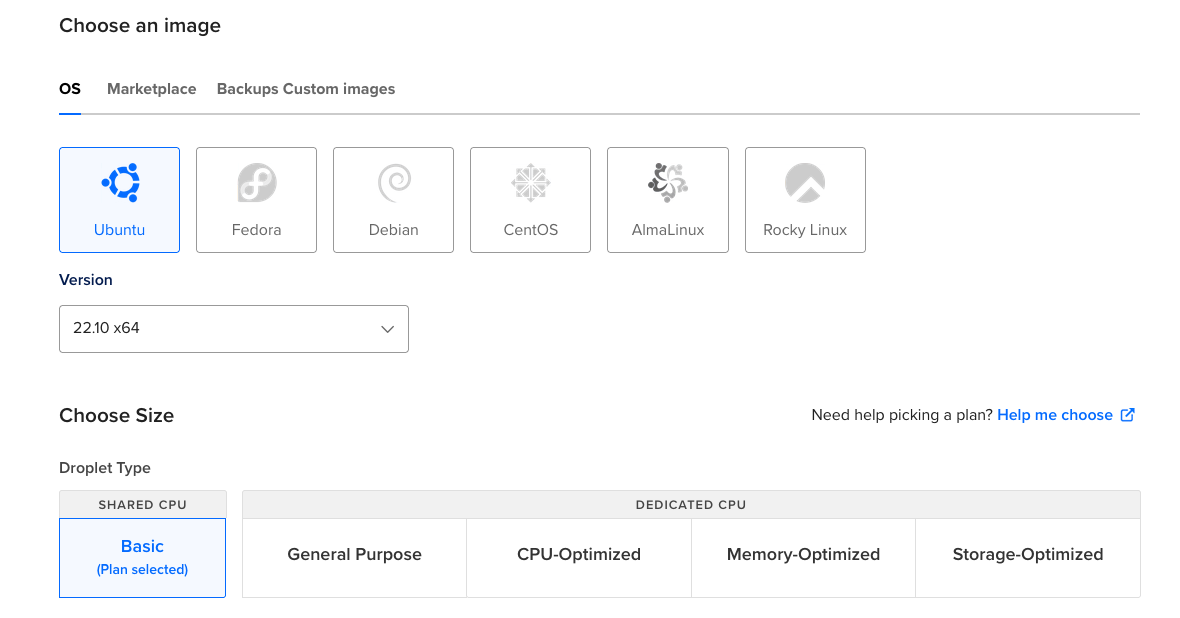
The process to run it is pretty simple. Set up a server wherever (I'll use digital ocean) and configure it to start with an SSH key. You need to select Ubuntu (which is a tiny bummer and would have preferred Debian but whatever) and then you are off to the races.

Then select a public SSH key you already have in the account.

Setting up MRSK

On your computer run gem install mrsk if you have ruby or alias mrsk='docker run --rm -it -v $HOME/.ssh:/root/.ssh -v /var/run/docker.sock:/var/run/docker.sock -v ${PWD}/:/workdir  ghcr.io/mrsked/mrsk' if you want to do it as a Docker container. I did the second option, sticking that line in my .zshrc file.

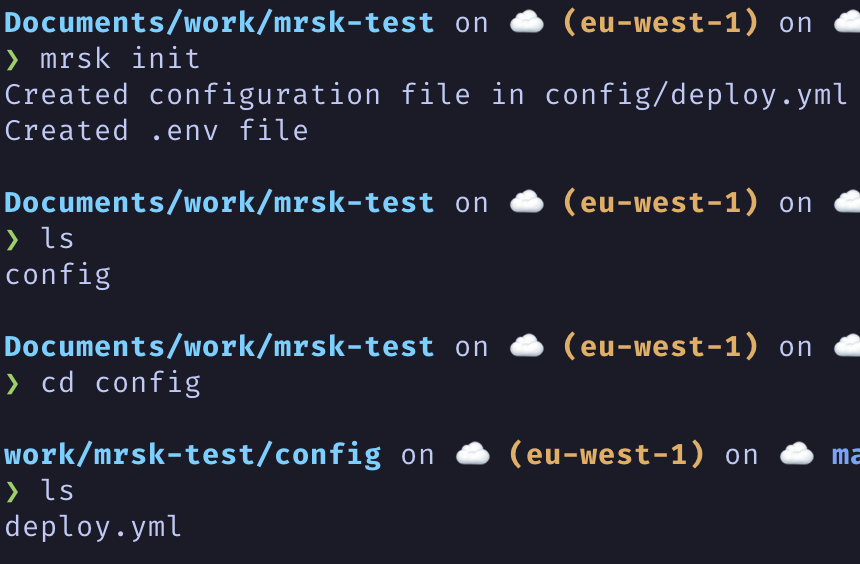
Once installed you run mrsk init which generates all you need.

The following is the configuration file that is generated and gives you an idea of how this all works.

# Name of your application. Used to uniquely configure containers.
service: my-app

# Name of the container image.
image: user/my-app

# Deploy to these servers.
servers:
  - 192.168.0.1

# Credentials for your image host.
registry:
  # Specify the registry server, if you're not using Docker Hub
  # server: registry.digitalocean.com / ghcr.io / ...
  username: my-user

  # Always use an access token rather than real password when possible.
  password:
    - MRSK_REGISTRY_PASSWORD

# Inject ENV variables into containers (secrets come from .env).
# env:
#   clear:
#     DB_HOST: 192.168.0.2
#   secret:
#     - RAILS_MASTER_KEY

# Call a broadcast command on deploys.
# audit_broadcast_cmd:
#   bin/broadcast_to_bc

# Use a different ssh user than root
# ssh:
#   user: app

# Configure builder setup.
# builder:
#   args:
#     RUBY_VERSION: 3.2.0
#   secrets:
#     - GITHUB_TOKEN
#   remote:
#     arch: amd64
#     host: ssh://[email protected]

# Use accessory services (secrets come from .env).
# accessories:
#   db:
#     image: mysql:8.0
#     host: 192.168.0.2
#     port: 3306
#     env:
#       clear:
#         MYSQL_ROOT_HOST: '%'
#       secret:
#         - MYSQL_ROOT_PASSWORD
#     files:
#       - config/mysql/production.cnf:/etc/mysql/my.cnf
#       - db/production.sql.erb:/docker-entrypoint-initdb.d/setup.sql
#     directories:
#       - data:/var/lib/mysql
#   redis:
#     image: redis:7.0
#     host: 192.168.0.2
#     port: 6379
#     directories:
#       - data:/data

# Configure custom arguments for Traefik
# traefik:
#   args:
#     accesslog: true
#     accesslog.format: json

# Configure a custom healthcheck (default is /up on port 3000)
# healthcheck:
#   path: /healthz
#   port: 4000

Good to go?

Well not 100%. On first run I get this:

❯ mrsk deploy
Acquiring the deploy lock
fatal: not a git repository (or any parent up to mount point /)
Stopping at filesystem boundary (GIT_DISCOVERY_ACROSS_FILESYSTEM not set).
  ERROR (RuntimeError): Can't use commit hash as version, no git repository found in /workdir

Apparently the directory you work in needs to be a git repo. Fine, easy fix. Then I got a perplexing SSH error.

❯ mrsk deploy
Acquiring the deploy lock
fatal: ambiguous argument 'HEAD': unknown revision or path not in the working tree.
Use '--' to separate paths from revisions, like this:
'git <command> [<revision>...] -- [<file>...]'
  INFO [39265e18] Running /usr/bin/env mkdir mrsk_lock && echo "TG9ja2VkIGJ5OiAgYXQgMjAyMy0wNS0wOVQwOToyNzoxNloKVmVyc2lvbjog
SEVBRApNZXNzYWdlOiBBdXRvbWF0aWMgZGVwbG95IGxvY2s=
" > mrsk_lock/details on 206.81.22.60
  ERROR (Net::SSH::AuthenticationFailed): Authentication failed for user [email protected]

❯ ssh [email protected]
Welcome to Ubuntu 22.10 (GNU/Linux 5.19.0-23-generic x86_64)

 * Documentation:  https://help.ubuntu.com
 * Management:     https://landscape.canonical.com
 * Support:        https://ubuntu.com/advantage

  System information as of Tue May  9 09:26:40 UTC 2023

  System load:  0.0               Users logged in:       0
  Usage of /:   6.7% of 24.06GB   IPv4 address for eth0: 206.81.22.60
  Memory usage: 19%               IPv4 address for eth0: 10.19.0.5
  Swap usage:   0%                IPv4 address for eth1: 10.114.0.2
  Processes:    98

0 updates can be applied immediately.

New release '23.04' available.
Run 'do-release-upgrade' to upgrade to it.


Last login: Tue May  9 09:26:41 2023 from 188.177.18.83
root@ubuntu-s-1vcpu-1gb-fra1-01:~#

So Ruby SSH Authentication failed even though I had the host configured in the SSH config and the standard SSH login worked without issue. Then a bad thought occurs to me. "Does it care....what the key is called? Nobody would make a tool that relies on SSH and assume it's id_rsa right?"

❯ mrsk deploy
Acquiring the deploy lock
fatal: ambiguous argument 'HEAD': unknown revision or path not in the working tree.
Use '--' to separate paths from revisions, like this:
'git <command> [<revision>...] -- [<file>...]'
  INFO [6c25e218] Running /usr/bin/env mkdir mrsk_lock && echo "TG9ja2VkIGJ5OiAgYXQgMjAyMy0wNS0wOVQwOTo1Mjo0NloKVmVyc2lvbjog
SEVBRApNZXNzYWdlOiBBdXRvbWF0aWMgZGVwbG95IGxvY2s=
" > mrsk_lock/details on 142.93.110.241
Enter passphrase for /root/.ssh/id_rsa:
Booooooh

Moving past the bad SSH

Then I get this error:

❯ mrsk deploy
Acquiring the deploy lock
fatal: ambiguous argument 'HEAD': unknown revision or path not in the working tree.
Use '--' to separate paths from revisions, like this:
'git <command> [<revision>...] -- [<file>...]'
  INFO [3b53d161] Running /usr/bin/env mkdir mrsk_lock && echo "TG9ja2VkIGJ5OiAgYXQgMjAyMy0wNS0wOVQwOTo1ODoyOVoKVmVyc2lvbjog
SEVBRApNZXNzYWdlOiBBdXRvbWF0aWMgZGVwbG95IGxvY2s=
" > mrsk_lock/details on 142.93.110.241
Enter passphrase for /root/.ssh/id_rsa:
  INFO [3b53d161] Finished in 6.094 seconds with exit status 0 (successful).
Log into image registry...
  INFO [2522df8b] Running docker login -u [REDACTED] -p [REDACTED] on localhost
  INFO [2522df8b] Finished in 1.209 seconds with exit status 0 (successful).
  INFO [2e872232] Running docker login -u [REDACTED] -p [REDACTED] on 142.93.110.241
  Finished all in 1.3 seconds
Releasing the deploy lock
  INFO [2264c2db] Running /usr/bin/env rm mrsk_lock/details && rm -r mrsk_lock on 142.93.110.241
  INFO [2264c2db] Finished in 0.064 seconds with exit status 0 (successful).
  ERROR (SSHKit::Command::Failed): docker exit status: 127
docker stdout: Nothing written
docker stderr: bash: line 1: docker: command not found

docker command not found? I thought MRSK set it up.

From the GitHub:

This will:

    Connect to the servers over SSH (using root by default, authenticated by your ssh key)
    Install Docker on any server that might be missing it (using apt-get): root access is needed via ssh for this.
    Log into the registry both locally and remotely
    Build the image using the standard Dockerfile in the root of the application.
    Push the image to the registry.
    Pull the image from the registry onto the servers.
    Ensure Traefik is running and accepting traffic on port 80.
    Ensure your app responds with 200 OK to GET /up.
    Start a new container with the version of the app that matches the current git version hash.
    Stop the old container running the previous version of the app.
    Prune unused images and stopped containers to ensure servers don't fill up.

However:

root@ubuntu-s-1vcpu-1gb-fra1-01:~# which docker
root@ubuntu-s-1vcpu-1gb-fra1-01:~#

Fine I guess I'll install Docker. Not feeling like this is saving a lot of time vs rsyncing a Docker Compose file over.

sudo apt update
sudo apt upgrade -y
sudo apt install -y docker.io curl git
sudo usermod -a -G docker ubuntu

Now we have Docker on the machine.

Did it work after that?

Yeah so my basic Flask app needed to have a new route added to it, but once I saw that you need to configure a route at /up  and did that, worked fine. The traffic is successfully paused during deployment and rerun once the application is healthy again. Overall once I got it running it worked much as intended.

I also tried accessories, which is their term for necessary internal services like mysql. These are more like standard Docker compose commands but they're nice to be able to include. Again, it feels a little retro to say "please install mysql on the mysql box" and just hope that box doesn't go down, but it's totally serviceable. I didn't encounter anything interesting with the accessory testing.

Impressions

MRSK is an interesting tool. I think, if the community adopts it and irons out the edge cases, it'll be a good building-block technology for people not interested in running infrastructure. Comparing it to Kubernetes is madness, in the same way I wouldn't compare a go-kart I made in my garage to semi-truck.

MRSK

Kubernetes

That isn't to hate on MRSK, I think it's a good idea to solve for people with less complicated concerns. However part of the reasons more complicated tools are complicated is because they cover more edgecases and automate more failure scenarios. MRSK doesn't cover for those, so it gets to be more simple, but as you grow more of those concerns shift back to you.

It's the difference between managing 5 hosts with Ansible and 1500. 5 is easy and scales well, 1500 becomes a nightmare. MRSK in its current state should be seen as a bridge technology unless your team expends the effort to customize it for your workflow and add in the gaps in monitoring.

If it were me and I was starting a company today, I'd probably invest the effort in something like GKE Autopilot where GCP manages almost all the node elements and I worry exclusively about what my app is doing. But I have a background in k8s so I understand I'm an edge case. If you are looking to start a company or a project and want to keep it strictly cloud-agnostic, MRSK does do it.

What I would love to see added to MRSK to work-proof it more:

  • Adding support for 1Password/secret manager for the SSH key component so it isn't a key on your local machine
  • Adding support for multiple users with different keys on the box managed inside of some secret configuration so you can tell what user did what deployment and rotation of keys is part of deployment as needed (you can set a user per config file but that isn't really granular enough to scale)
  • Fixing the issue where the ssh_config doesn't seem to be respected
  • Providing an example project in the documentation of what exactly you need to hit msrk deploy and have a functional project up and running
  • Let folks know that having the configuration file inside of a git repo is a requirement
  • Ideally integrating some concept of autoscaling group into the configuration with some lookup concept back to the config file (which you can do with an template but would be nice to build in)
  • Do these servers update themselves? What happens if Docker crashes? Can I pass resource limits to the service and not just accessories? A lot of missing pieces there.
  • mrsk details is a great way to quickly see the health status, but you obviously need to do more to monitor whether your app is functional or not. That's more on you than the MRSK team.

Should you use MRSK today

If you are a single developer who runs a web application, ideally a rails application, and you are provisioning your servers one by one with Terraform or whatever, where static IP addresses (internal or external) are something you can get and don't change often, this is a good tool for you. I wouldn't recommend using the accessories functionality, I think you'll probably want to use a hosted database service if possible. However it did work, so I mean just consider how critical uptime is to you when you roll this out.

However if you are on a team, I don't know if I can recommend this at the current juncture. Certainly not run from a laptop. If you integrate this into a CI/CD system where the users don't have access to the SSH key and you can lock that down such that it stops being a problem, it's more workable. However as (seemingly) envisioned this tool doesn't really scale to multiple employees unless you have another system swapping the deployment root SSH key at a regular interval and distributing that to end users.

You also need to do a lot of work around upgrades, health monitoring of the actual VMs, writing some sort of replacement system if the VM dies and you need to put another one in its place. What is the feedback loop back to this static config file to populate IP addresses, automating rollbacks if something fails, monitoring deployments to ensure they're not left in a bad state, staggering the rollout (which MRSK does support). There's a lot here that comes in the box with conventional tooling that you need to write here.

If you want to use it today

Here's the minimum I would recommend.

  • I'd use something like the 1Password SSH agent so you can at least distribute keys across the servers without having to manually add them to each laptop: https://developer.1password.com/docs/ssh/agent/
  • I'd set up a bastion server (which is supported by MSRK and did work in my testing). This is a cheap box that means you don't need to allow your application and database servers to be exposed directly to the internet. There is a decent tutorial on how to make one here: https://zanderwork.com/blog/jump-host/
  • Ideally do this all from within a CI/CD stack so that you are running it from one central location and can more easily centralize the secret storage.

Parse YAML and push to Confluence in Python

I recently rewrote a system to output a YAML to get a bunch of information for internal users. However we use Confluence as our primary information sharing system. So I needed to parse the YAML file on GitHub (where I was pushing it after every generation), generate some HTML and then push this up to Confluence on a regular basis. This was surprisingly easy to do and so I wanted to share how I did it.

from atlassian import Confluence
from bs4 import BeautifulSoup
import yaml
import requests
import os

print(os.environ)
git_username = "github-username"
git_token = os.environ['GIT-TOKEN']
confluence_password = os.environ['CONFLUENCE-PASSWORD']
url = 'https://raw.githubusercontent.com/org/repo/file.yaml'
page_id=12345678
page_title='Title-Of-Confluence-Page'
path='/tmp/file.yaml'
original_html =  '''<table>
  <tr>
    <th>Column Header 1</th>
    <th>Column Header 2</th>
    <th>Column Header 3</th>
    <th>Column Header 4</th>
  </tr>
</table>'''

def get_file_from_github(url, username, password):
    response = requests.get(url, stream=True, auth=(username,password))
    print(response)
    with open(path, 'wb') as out_file:
        out_file.write(response.content)
        print('The file was saved successfully')

def update_confluence(path, page_id, page_title, original_html):
    with open(path, 'r') as yamlfile:
        current_yaml = yaml.safe_load(yamlfile)

    confluence = Confluence(
            url='https://your-hosted-confluence.atlassian.net',
            username='[email protected]',
            password=confluence_password,
            cloud=True)
    soup = BeautifulSoup(original_html, 'html5lib')
    table = soup.find('table')
    
    #This part is going to change based on what you are parsing but hopefully provides a template. 

    for x in current_yaml['top-level-yaml-field']:
        dump = '\n'.join(x['list-of-things-you-want'])
        pieces = x['desc'].split("-")

        table.append(BeautifulSoup(f'''
                                <tr>
                                  <td>{name}</td>
                                  <td>{x['role']}</td>
                                  <td>{x['assignment']}</td>
                                  <td style="white-space:pre-wrap; word-									wrap:break-word">{dump}</td>
                                </tr>''', 'html.parser'))
    
    body = str(soup)
    update = confluence.update_page(page_id, page_title, body, parent_id=None, type='page', representation='storage', minor_edit=False, full_width=True)
    
    print(update)

def main(request):
    if confluence_password is None:
        print("There was an issue accessing the secret.")
    get_file_from_github(url, git_username, git_token)
    update_confluence(path, page_id, page_title, original_html)
    return "Confluence is updated"

Some things to note:

  • obviously the YAML parsing depends on the file you are going to parse
  • The Confluence Page ID is most easily grabbed from the URL in Confluence when you make the page. You can get instructions on how to grab the Page ID here.
  • I recommend making the Confluence page first, grabbing the ID and then running it as an update.
  • I'm running logging through a different engine.
  • The github token should be a read-only token scoped to just the repo you need. Don't make a large token.

The deployment process on GCP couldn't have been easier.  Put your secrets in the GCP secret manager and then run:

gcloud functions deploy confluence_updater --entry-point main --runtime python310 --trigger-http --allow-unauthenticated --region=us-central1 --service-account serverless-function-service-account@gcp-project-name.iam.gserviceaccount.com --set-secrets 'GIT-TOKEN=confluence_git_token:1,CONFLUENCE-PASSWORD=confluence_password:1'
  • I have --allow-unauthenticated just for testing purposes. You'll want to put it behind auth
  • The set-secrets loads them an environmental variables.

There you go! You'll have a free function you can use forever to parse YAML or any other file format from GitHub and push to Confluence as HTML for non-technical users to consume.

The requirements.txt I used is below:

atlassian-python-api==3.34.0
beautifulsoup4==4.11.2
functions-framework==3.3.0
install==1.3.5
html5lib==1.1

Problems? Hit me up on Mastodon: https://c.im/@matdevdug


TIL How to write a Python CLI tool that writes Terraform YAML

I'm trying to use more YAML in my Terraform as a source of truth instead of endlessly repeating the creation of resources and to make CLIs to automate the creation of the YAML. One area that I've had a lot of luck with this is GCP IAM. This is due to a limitation in GCP that doesn't allow for the combination of pre-existing IAM roles into custom roles, which is annoying. I end up needing to assigns people the same permissions to many different projects and wanted to come up with an easier way to do this.

I did run into one small problem. When attempting to write out the YAML file, PyYAML was inserting these strange YAML tags into the end file that looked like this: !!python/tuple.

It turns out this is intended behavior, as PyYAML is serializing arbitrary objects as generic YAML, it is inserting deserialization hint tags. This would break the Terraform yamldecode as it couldn't understand the tags being inserted. The breaking code looks as follows.

with open(path,'r') as yamlfile:
    current_yaml = yaml.safe_load(yamlfile)
    current_yaml['iam_roles'].append(permissions)

if current_yaml:
    with open(path,'w') as yamlfile:
        yaml.encoding = None
        yaml.dump(current_yaml, yamlfile, indent=4, sort_keys=False)

I ended up stumbling across a custom Emitter setting to fix this issue for Terraform. This is probably not a safe option to enable, but it does seem to work for me and does what I would expect.

The flag is: yaml.emitter.Emitter.prepare_tag = lambda self, tag: ''

So the whole thing, including the click elements looks as follows.

import click
import yaml

@click.command()

@click.option('--desc', prompt='For what is this role for? Example: analytics-developer, devops, etc', help='Grouping to assign in yaml for searching')

@click.option('--role', prompt='What GCP role do you want to assign?', help="All GCP premade roles can be found here: https://cloud.google.com/iam/docs/understanding-roles#basic")

@click.option('--assignment', prompt="Who is this role assigned to?", help="This needs the syntax group:, serviceAccount: or user: before the string. Example: group:[email protected] or serviceAccount:[email protected]")

@click.option('--path', prompt="Enter the relative path to the yaml you want to modify.", help="This is the relative path from this script to the yaml file you wish to append to", default='project-roles.yaml')

@click.option('--projects', multiple=True, type=click.Choice(['test', 'example1', 'example2', 'example3']))

def iam_augmenter(path, desc, role, assignment, projects):
    permissions = {}
    permissions["desc"] = desc
    permissions["role"] = role
    permissions["assignment"] = assignment
    permissions["projects"] = projects

    with open(path,'r') as yamlfile:
        current_yaml = yaml.safe_load(yamlfile)
        current_yaml['iam_roles'].append(permissions)

    if current_yaml:
        with open(path,'w') as yamlfile:
            yaml.emitter.Emitter.prepare_tag = lambda self, tag: ''
            yaml.encoding = None
            yaml.dump(current_yaml, yamlfile, indent=4, sort_keys=False)

if __name__ == '__main__':
    iam_augmenter()

This worked as intended, allowing me to easily append to an existing YAML file with the following format:

iam_roles:
  - desc: analytics-reader-bigquery-data-viewer
    role: roles/bigquery.dataViewer
    assignment: group:[email protected]
    projects:
    - example1
    - example2
    - example3

This allowed me to easily add the whole thing to automation that can be called from a variety of locations, meaning we can keep using the YAML file as the source of truth but quickly append to it from different sources. Figured I would share as this took me an hour to figure out and maybe it'll save you some time.

The Terraform that parses the file looks like this:

locals {
  all_iam_roles = yamldecode(file("project-roles.yaml"))["iam_roles"]


  stock_roles = flatten([for iam_role in local.all_iam_roles :
    {
      "description" = "${iam_role.desc}"
      "role"        = "${iam_role.role}"
      "member"      = "${iam_role.assignment}"
      "project"     = "${iam_role.projects}"
    }
  ])
  
  # Shortname for projects to full names
  test          = "test-dev"
  example1      = "example1-dev"
  example2      = "example2-dev"
  example3      = "example3-dev"
}

resource "google_project_iam_member" "test-dev" {
  for_each = {
    for x in local.stock_roles : x.description => x
    if contains(x.project, local.test) == true
  }
  project = local.test
  role    = each.value.role
  member  = each.value.member
}

resource "google_project_iam_member" "example1-dev" {
  for_each = {
    for x in local.stock_roles : x.description => x
    if contains(x.project, local.example1) == true
  }
  project = local.example1
  role    = each.value.role
  member  = each.value.member
}

Hopefully this provides someone out there in GCP land some help with handling large numbers of IAM permissions. I've found it to be much easier to wrangle as a Python CLI that I can hook up to different sources.

Did I miss something or do you have questions I didn't address? Hit me up on Mastodon: https://c.im/@matdevdug


Layoffs are Cruel and Don't Work

Imagine you had a dog. You got the dog when it was young, trained and raised it. This animal was a part of your family and you gave it little collars and cute little clothes with your family name on it. The dog came to special events and soon thought of this place as its home and you all as loved ones. Then one day with no warning, you locked the dog out of the house. You and the other adults in the house had decided getting rid of any random dog was important to the bank that owned your self, so you locked the door. Eventually it wandered off, unsure of why you had done this, still wearing the sad little collar and t-shirt with your name.

If Americans saw this in a movie, people would be warning each other that it was "too hard to watch". In real life, this is an experience that a huge percentage of people working in tech will go through. It is a jarring thing to watch, seeing former coworkers told they don't work there anymore by deactivating their badges and watching them try to swipe through the door. I had an older coworker who we'll call Bob, upon learning it was layoffs, took off for home. "I can't watch this again" he said as he quickly shoved stuff into his bag and ran out the door.

In that moment all illusion vanishes. This place isn't your home, these people aren't your friends and your executive leadership would run you over with their cars if you stood between them and revenue growth. Your relationship to work changes forever. You will never again believe that you are "critical" to the company or that the company is interested in you as a person. I used to think before the layoffs that Bob was a cynic, never volunteering for things, always double-checking the fine print of any promise made by leadership. I was wrong and he was right.

Layoffs don't work

Let us set aside the morality of layoffs for a moment. Do layoffs work? Are these companies better positioned after they terminate some large percentage of people to compete? The answer appears to be no:

The current study investigated the financial effects of downsizing in Fortune 1000 Companies during a five-year period characterized by continuous economic growth. Return on assets, profit margin, earnings per share, revenue growth, and market capitalization were measured each year between 2003 and 2007. In general, the study found that both downsized and nondownsized companies reported positive financial outcomes during this period. The downsized companies, however, were outperformed consistently by the nondownsized ones during the initial two years following the downsizing. By the third year, these differences became statistically nonsignificant. Consequently, although many companies appear to conduct downsizing because the firm is in dire financial trouble, the results of this study clearly indicated that downsizing does not enhance companies' financial competitiveness in the near-term. The authors discuss the theoretical and practical implications of these findings.

Source

In all my searching I wasn't able to find any hard data which suggests layoffs either enable a company to better compete or improve earnings in the long term. The logic executives employ seems to make sense on its face. You eliminate employees and departments which enable you to use that revenue to invest in more profitable areas of the business. You are scaling to meet demand, so you don't have employees churning away at something they don't need to be working on. Finally you are eliminating low performance employees.

It’s about the triumph of short-termism, says Wharton management professor Adam Cobb. “For most firms, labor represents a fairly significant cost. So, if you think profit is not where you want it to be, you say, ‘I can pull this lever and the costs will go down.’ There was a time when social norms around laying off workers when the firm is performing relatively well would have made it harder. Now it’s fairly normal activity.”

This all tracks until you start getting into the details. Think about it strictly from a financial perspective. Firms hire during boom periods, paying a premium for talent. Then they layoff people, incurring the institutional hit of losing all of that knowledge and experience. Next time they need to hire, they're paying that premium again. It is classic buying high and selling low. In retail and customer facing channels, this results in a worse customer experience, meaning the move designed to save you money costs you more in the long term. Investors don't even always reward you for doing it, even though they ask for them.

Among the current tech companies this logic makes even less sense. Meta, Alphabet, PayPal and others are profitable companies, so this isn't even a desperate bid to stay alive. These companies are laying people off in response to investor demand and imitative behavior. After decades of research, executive know layoffs don't do what it says on the box, but their board is asking why they aren't considering layoffs and so they proceed anyway.

Low-performing Employees

A common argument I've heard is "well ok, maybe layoffs don't help the company directly, but it is an opportunity to get rid of dead weight". Sure, except presumably at-will employers could have done that at any time if they had hard data that suggested this pool of employees weren't working out.

Recently, we asked 30 North American human resource executives about their experiences conducting white-collar layoffs not based on seniority — and found that many believed their organizations had made some serious mistakes. More than one-third of the executives we interviewed thought that their companies should have let more people go, and almost one-third thought they should have laid off fewer people. In addition, nearly one-third of the executives thought their companies terminated the wrong person at least 20% of the time, and approximately an additional quarter indicated that their companies made the wrong decision 10% of the time. More than one-quarter of the respondents indicated that their biggest error was terminating someone who should have been retained, while more than 70% reported that their biggest error was retaining someone who should have been terminated.

Source

Coming up with a scientific way of determining who is doing a good job and who is doing a bad job is extremely hard. If your organization wasn't able to identify those people before layoffs, you can't do it at layoff time. My experience with layoffs is it is less a measure of quality and more an opportunity for leadership to purge employees who are expensive, sick or aren't friends with their bosses.

All in all we know layoffs don't do the following:

  • They don't reliably increase stock price (American Express post layoffs)
  • Layoffs don't increase productivity or employee engagement (link)
  • It doesn't keep the people you have. For example, layoffs targeting just 1% of the workforce preceded, on average, a 31% increase in turnover. Source
  • It doesn't help you innovate or reliably get rid of low-performance employees.

Human Cost

Layoffs also kill people. Not in the spiritual sense, but in the real physical sense. In the light beach book "MORTALITY, MASS-LAYOFFS, AND CAREER OUTCOMES:
AN ANALYSIS USING ADMINISTRATIVE DATA" which you can download here we see some heavy human costs for this process.

We find that job displacement leads to a 15-20%
increase in death rates during the following 20 years. If such increases were sustained beyond this period, they would imply a loss in life expectancy of about 1.5 years for a worker displaced at age 40.

The impact isn't just on the people you lay-off, but on the people who have to lay them off and the employee who remain. It is a massive trickle-down effect which destroys morale at a critical juncture in your company. Your middle management is going to be more stressed and less capable. The employees you have are going to be less efficient and capable as well.

This isn't a trivial amount of damage being done here. Whatever goodwill an employer has built with their employees is burned to the ground. The people you have left are going to trust you less, not work as hard, be more stressed and resent you more. This is at a time when you are asking more of the remaining teams, feeding into that increase in turnover.

If you were having trouble executing before, there is no way in hell it gets better after this.

Alternatives

“Companies often attempt to move out of an unattractive game and into an attractive one through acquisition. Unfortunately, it rarely works. A company that is unable to strategize its way out of a current challenging game will not necessarily excel at a different one—not without a thoughtful approach to building a strategy in both industries. Most often, an acquisition adds complexity to an already scattered and fragmented strategy, making it even harder to win overall.”

So if layoffs don't work, what are the options? SAS Institute has always been presented as a fascinating outlier in this area as a software company that bucks the trends. One example I kept seeing was SAS Institute has never done layoffs, instead hiring during downturns as a way to pick up talent for cheap.  You can read about it here.

Now in reality the SAS Institute has done small rounds of layoffs, so this often-repeated story isn't as true as it sounds. Here they are laying off 100 people. These folks were in charge of a lot of office operations during a time when nobody was going to the office but it still counts. However the logic behind not doing mass layoffs still holds true despite the lie being repeated that SAS Institute never ever does them.  

Steve Jobs also bucked this trend somewhat famously.

"We've had one of these before, when the dot-com bubble burst. What I told our company was that we were just going to invest our way through the downturn, that we weren't going to lay off people, that we'd taken a tremendous amount of effort to get them into Apple in the first place -- the last thing we were going to do is lay them off. And we were going to keep funding. In fact we were going to up our R&D budget so that we would be ahead of our competitors when the downturn was over. And that's exactly what we did. And it worked. And that's exactly what we'll do this time."

If you truly measure the amount of work it takes to onboard employees, get them familiar with your procedures and expectations and retain them during the boom times, it really stops making sense to jettison them during survivable downturns. These panic layoffs that aren't based in any sort of hard science or logic are amazing opportunities for company who are willing to weather some bad times and emerge intact with a motivated workforce.

It's not altruism at work. Rather, executives at no-layoff companies argue that maintaining their ranks even in terrible times breeds fierce loyalty, higher productivity, and the innovation needed to enable them to snap back once the economy recovers.

So if you work for any company, especially in tech, and leadership starts discussing layoffs, you should know a few things. They know it doesn't do what they say it does. They don't care that it is going to cause actual physical harm to some of the people they are doing it to. These execs are also aware it isn't going to be a reliable way of getting rid of low-performing employees or retaining high performing ones.

If you choose to stay after a round of layoffs, you are going to be asked to do more with less. The people you work with are going to be disinterested in their jobs or careers and likely less helpful and productive than ever before. Any loyalty or allegiance to the company is dead and buried, so expect to see more politics and manipulations as managers attempt to give leadership what they want in order to survive.

On the plus side you'll never have the same attitude towards work again.


Why are passwords a users problem?

Why are passwords a users problem?

In the light of GoTo admitting their breach was worse than initially reported I have found myself both discussing passwords with people more than ever before and directing a metric ton of business towards 1Password. However, it has raised an obvious question for me: why are users involved with passwords at all? Why is this still something I have to talk to my grandparents about?

Let us discuss your password storage system again

All the major browsers have password managers that sync across devices. These stores are (as far as I can tell) reasonably secure. Access to the device would reveal them, but excluding physical access to an unlocked computer they seem fine. There is a common API, the Credentials Management API docs here that allow for a website to query the password store inside of the browser for the login, even allowing for Federated logins or different or same logins for subdomains as part of the spec. This makes for a truly effortless login experience for users without needing them to do anything. These browsers already have syncing with a master password concept across mobile/desktop and can generate passwords upon request.

If the browser can: generate a password, store a password, sync a password and return the password when asked, why am I telling people to download another tool that does the exact same thing? A tool made by people who didn't make the browser and most of whom haven't been independently vetted by anybody.

Surely it can't be that easy

So when doing some searching about the Credentials Management API, one of the sites you run across a lot is this demo site: https://credential-management-sample.appspot.com/. This allows you to register an account, logout and then see the login auto-filled by the browser when you get back to it. The concept seems to work as expected on Chrome.

Bummer

Alright so it doesn't work on Firefox and Safari but honestly, neither do 10% of the websites I go to. 88% of all the users in the world still isn't bad, so I'm not willing to throw the idea out entirely.

Diving into how the process works, again, it seems pretty straight forward.

var signin = document.querySelector('#signin');
signin.addEventListener('click', (e) => {
  if (window.PasswordCredential || window.FederatedCredential) {
    navigator.credentials
      .get({
        password: true,
        federated: {
          providers: ['https://accounts.google.com'],
        },
        mediation: 'optional',
      })
      .then((c) => {
        if (c) {
          switch (c.type) {
            case 'password':
              return sendRequest(c);
              break;
            case 'federated':
              return gSignIn(c);
              break;
          }
        } else {
          return Promise.resolve();
        }
      })
      .then((profile) => {
        if (profile) {
          updateUI(profile);
        } else {
          location.href = '/signin';
        }
      })
      .catch((error) => {
        location.href = '/signin';
      });
  }
});

If the user has a login then get it. It supports federated logins or passwords and falls back to redirecting to the sign-in page if you cannot locate a login. I tried the samples available here and they seemed to mostly be plug and play. In fact in my testing this seemed to be a far superior user experience to using traditional password managers with browser extensions.

Also remember that even for browsers that don't support it, I'm just falling back to the normal password storage system. So for websites that support it, the experience is magical on Chrome and the same as using a password manager with every other browser. It doesn't cost anything, it isn't complicated and it is a better experience.

I know someone out there is gearing up 

Are Password Managers Better?

One common theme when you search for this stuff is an often repeated opinion that browser password managers are trash and password managers are better. Looking more into how they work, this seems to come with some pretty big asterisks. Most password managers seem to use some JavaScript from their CDN to insert their interface into the form values.

This is a little nerve-racking because websites could interact with that element but also the communication between the password manager is a potential source of problems. Communication to a local HTTP target seems to make sense, but this can be the source of problems (and has been in the past). Example Example Example

So at a minimum you'd need the tool you chose to meet these requirements to reach or exceed the same level of security as the browser built-in manager.

  • The add-on runs in a sandboxed background page
  • Communication between the password manager and the page isn't happening in the DOM
  • Any password element would need to be an iframe or something else that stops the site from interacting with the content
  • CSP is set up flawlessly
  • Communication between the extension and anything outside of the extension is secure and involves some verification step
  • Code validation in pretty much every direction: is the browser non-modified, is the server process valid, is the extension good, etc

This isn't even getting to the actual meat of the encryption on the secrets or the security of the syncing. We're just talking about whether the thing that interacts with the secrets and jams them into the page.

To make a product that does this and does it well and consistently across releases isn't an easy problem. Monitoring for regressions and breaches would be critical, disclosures would be super important to end users and you would need to get your stack vetted by an outside firm kind of a lot. I trust the developers of my web browser in part because I have to and because, over the years, Mozilla has been pretty good to me. The entire browser stack is under constant attack because it has effectively become the new OS we all run.

Well these companies are really good at all that

Are they? Frankly in my research I wasn't really blown away with the amount of technical auditing most of these companies seem to do or produce any evidence of. The only exception to this was 1Password and Bitwarden.

1Password

I love that they have a whitepaper available here but nobody finished writing it.

No rush I guess

However they do have actual independent audits of their software. Recent audits done by reputable firms and available for review. You can see all these here. For the record this should be on every single one of these companies website for public review.

Keeper Password Manager

I found what they call a whitepaper but it's 17 pages and basically says "We're ISO certified". That's great I guess, but not the level of detail I would expect at all. You can read it here. This doesn't mean you are doing things correctly, just that you have generated enough documentation to get ISO certified.

Not only do we implement the most secure levels of encryption, we also adhere to very strict internal
practices that are continually audited by third parties to help ensure that we continue to develop secure software and
provide the world’s most secure cybersecurity platform.
Great, can I read these audits?

Dropbox Password

Nothing seems to exist discussing this products technical merits at all. I don't know how it works. I can look into it more if someone can point me to something else, but it seems to be an encrypted file that lives in your Dropbox folder secured with a key generated by Dropbox and returned to you upon enrollment.  

Dashlane

I found a great security assessment from 2016 that seemed to suggest the service was doing pretty well. You can get that here. I wasn't able to find one more recent. Reading their whitepaper here they actually do go into a lot of detail and explain more about how the service works, which is great and I commend them for that.

It's not sufficient though. I'm glad you understand how the process should work but I have no idea if that is still happening or if this is more of an aspirational document. I often understand the ideal way software should work but the real skill of the thing is getting it to work that way.

Bitwarden

They absolutely kill it in this department. Everything about them is out in the open like it should be. However sometimes they discover issues, which is good for the project but underscores what I was talking about above. It is hard to write a service that attempts to handle your most sensitive data and inject that data into random websites.

These products introduce a lot of complexity and failure points into the secret management game. All of them with the exception of 1Password seem to really bet the farm on the solo Master/Primary Password concept. This is great if your user picks a good password, but statistically this idea seems super flawed to me. This is a password they're going to enter all the time, won't they pick a crap one? Even with 100,000 iterations on that password it's pretty dangerous.

Plus if you are going to rely on the concept of "well if the Master/Primary Password is good then the account is secure" then we're certainly not justifying the extra work here. It's as good as the Firefox password manager and not as good as the Safari password manager. Download Firefox and set a good Primary Password.

Can we be honest with each other?

I want you to go to this website and I want you to type in your parents password. You know the one, the one they use for everything? The one that's been shouted through the halls and texted/emailed/written on so many post-it notes that any concept of security has long since left the building.

That's the password they're gonna use to secure the vault. They shouldn't, but they're gonna. Now I want you to continue on this trust exercise with me. If someone got access to read/write in a random cross-section of your coworkers computers, are passwords really the thing that is gonna destroy your life? Not an errant PDF, Excel document of customer data or unsecured AWS API key?

I get it, security stuff is fun to read. "How many super computers will it take to break in" feels very sci-fi.

Well but my family/coworkers/lovers all share passwords

I'm not saying there is zero value to a product where there is a concept of sharing and organizing passwords with a nice UI, but there's also no default universal way of doing it. If all the password managers made a spec that they held to that allowed for secure bidirectional sharing between these services, I'd say "yeah the cost/benefit is likely worth it". However chances are if we're in a rush and sharing passwords, I'm going to send you the password through an insecure system anyway.

Plus the concept of sharing introduces ANOTHER huge layer of possible problems. Permission mistakes, associating the secret with the wrong user, the user copying the secret into their personal vault and not getting updated when the shared secret is updated are all weird issues I've seen at workplaces. To add insult to injury, the requirements of getting someone added to a shared folder they need is often so time-consuming people will just bypass the process and copy/paste the secret anyway.

Also let's be honest among ourselves here. Creating one shared login for a bunch of employees to use was always a bad idea. We all knew it was a bad idea and you knew it while you were doing it. Somewhere in the back of your mind you were like "boy it'll suck if someone decides to quit and steals these".

I think we can all agree on this

I know, "users will do it anyway". Sure but you don't have to make it institutional policy. The argument of "well users are gonna share passwords so we should pay a service to allow them to do it easier" doesn't make a lot of sense. I also know sometimes you can't avoid it, but for those values, if they're that sensitive, it might not make sense to share them across all employees in a department. Might make more sense to set them up with a local tool like pass.

Browsers don't prompt the user to make a Master/Primary Password

That is true and perhaps the biggest point in the category of "you should use a password manager". The way the different browsers do this is weird. Chrome effectively uses the users login as the key, on Windows calling a Windows API that encrypts the sqlite database and decrypts it when the user logs in. On the Mac there is a login keychain entry of a random value that seems to serve the same function. If the user is logged in, the sqlite database is accessible. If they aren't, it isn't.

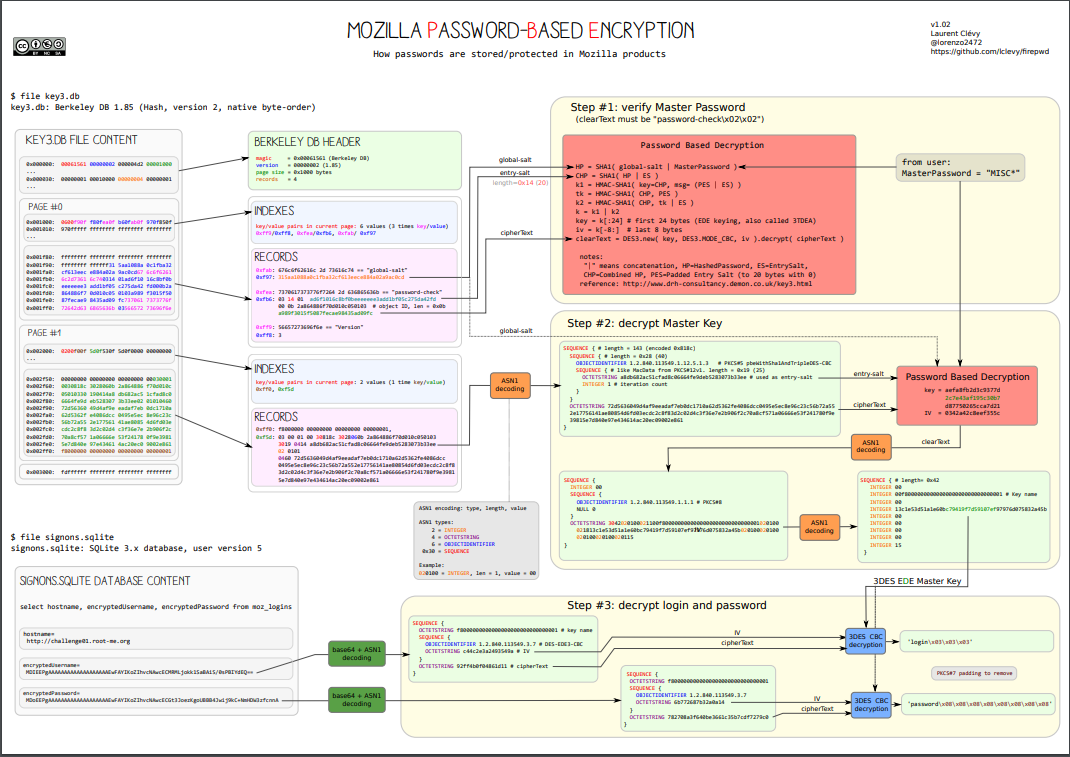
On Firefox there is a Primary Password that you can set that effectively works like most of the password managers that we saw. Unlike password managers this isn't synced, so you would set a different primary for every Firefox device. That means the Firefox account is still controlling what syncs to what, this just ensures that a user who takes the database of username and passwords would need this key to decrypt it.

So for Chrome if your user is logged in, the entire password database is available. On macOS they can get access to the decryption key through the login keychain and on Firefox the value is encrypted in the file but for additional security and disallowing for random users to interact with it through the browser. There is a great write-up of how local browser password stores work here.

There are more steps than Chrome but allows for a Master Password

Is that a sufficient level of security?

Honestly? Yeah I think so. The browser prompts the user to generate a secure value, stores the value, syncs the value securely and then, for 88% of the users on the web, the site can use a well-documented API to automatically fill in that value in the future. I'd love to see Chrome add a few more security levels, some concept of Primary Password so that I can lock the local password storage to something that isn't just me being logged into my user account.

However we're also rapidly reaching a point where the common wisdom is that everything important needs 2FA. So if we're already going to treat the password as a tiered approach, I think a pretty good argument could be made that it is safer for a user to store their passwords in the browser store (understanding that the password was always something that a malicious actor with access to their user account could grab through keyloggers/clipboard theft/etc) and having a 2FA on a phone as compared to what a lot of people do, which is keep the 2FA and the password inside of the same third-party password manager.

TOTPs are just password x2

When you scan that QR code, you are getting back a string that looks something like this:

otpauth://totp/example:[email protected]?algorithm=SHA1&digits=6&issuer=mywebsite&period=30&secret=CelwNEjn3l7SWIW5SCJT

This combined with time gets you your 6 digit code. The value of this approach is twofold: does the user posses another source of authentication and now there is a secret which we know is randomly generated that effectively serves as a second password. This secret isn't exposed to normal users as a string, so we don't need to worry about that.

If I have the secret value I can make the same code. If we remove the second device component like we do with password managers, what we're saying is "TOTP is just another random password". If we had a truly random password to begin with, I'm not adding much to the security model by adding in the 2FA but sticking it in the same place.

What if they break into my phone

On iOS even without a Primary password set on Firefox, it prompts for FaceID authentication before allowing someone access to the list of stored passwords. So that's already a pretty intense level of security. Add in a Primary password and we've reached the same level of security as 1Password. Chrome is the same story.

It's the same level of security with Android. Attempt to open the saved passwords, get a PIN or biometric check depending on the phone. That's pretty good! Extra worried about it? Use a TOTP app that requires biometrics before they reveal that code. Here is one for iOS

Even if someone steals your phone and attempts to break into your accounts, there are some non-trivial security measures in their way with the standard browser password storage combined with a free TOTP app that checks identity.

I use my password manager for more than passwords

Sure and so do I, but that doesn't really matter to my point. The common wisdom that all users would benefit from the use of a dedicated password manager is iffy at best. We've now seen a commonly recommended one become so catastrophically breached that anything stored there is now needs to be considered leaked. This isn't the first credential leak or the 10th or the 100th, but now there is just a constant never-ending parade of password leaks and cracks.

So if that is true and a single password cannot ever truly serve as the single step of authentication for important resources, then we're always going to be relying on adding on another factor. Therefore the value a normal user gets out of a password manager vs the browser they're already using is minimal. With passkeys and Credentials Management API the era of exposing the user to the actual values being used in the authentication step is coming to a close anyway. Keys synced by the browser vendor will become the default authentication step for users.

In the light of that reality, it doesn't really make sense to bother users with the additional work and hassle of running a new program to manage secrets.

Summary of my rant

  • Normal users don't need to worry about password managers and would be better served by using the passwords the browser generates and investing that effort into adding 2FA using a code app on their phone or a YubiKey.
  • In the face of new APIs and standards, the process of attempting to manage secrets with an external manager will becoming exceedingly challenging. It is going to be much much easier to pick one browser and commit to it everywhere vs attempting to use a tool to inject all these secrets
  • With the frequency of breaches we've already accepted that passwords at, at best, part of a complete auth story. The best solution we have right now is "2 passwords".
  • Many of the tools users rely on to manage all their secrets aren't frequently audited or if they are, any security assessment of their stack isn't being published.
  • For more technical users looking to store a lot of secrets for work, using something like pass will likely fulfill that need with a smaller less complicated and error-prone technical implementation. It does less so less stuff can fail.
  • If you are going to use a password manager, there are only two options: 1Password and Bitwarden. 1Password is the only one that doesn't rely exclusively on the user-supplied password, so if you are dealing with very important secrets this is the right option.
  • It is better to tell users "shared credentials are terrible and please only use them if you absolutely have no choice at all" than to set up a giant business-wide tool of shared credentials which are never rotated.

My hope is with passkeys and the Credentials Management API this isn't a forever problem. Users won't be able to export private keys, so nobody is going to be sharing accounts. The Credentials Management UI and flow is so easy for developers and users that it becomes the obvious choice for any new service. My suspicion is we'll still be telling users to set up 2FA well after its practical lifespan has ended, but all we're doing is replicating the same flow as the browser password storage.

Like it or not you are gonna start to rely on the browser password manager a lot soon, so might as well get started now.

Wanna send me angry messages? What else is the internet good for! https://c.im/@matdevdug


Upgrading Kubernetes - A Practical Guide

Upgrading Kubernetes - A Practical Guide

One common question I see on Mastodon and Reddit is "I've inherited a cluster, how do I safely upgrade it". It's surprising that this still isn't a better understood process given the widespread adoption of k8s, but I've had to take over legacy clusters a few times and figured I would write up some of the tips and tricks I've found over the years to make the process easier.

A very common theme to these questions is "the version of Kubernetes is very old, what do I do". Often this question is asked with shame, but don't feel bad. K8s is better at the long-term maintenance story as compared to a few years ago, but is still a massive amount of work to keep upgraded and patched. Organizations start to fall behind almost immediately and teams are hesitant to touch a working cluster to run the upgrades.

NOTE: A lot of this doesn't apply if you are using hosted Kubernetes. In that case, the upgrade process is documented through the provider and is quite a bit less complicated.

How often do I need to upgrade Kubernetes?

This is something people new to Kubernetes seem to miss a lot, so I figured I would touch on it. Unlike a lot of legacy infrastructure projects, k8s moves very quickly in terms of versions. Upgrading can't be treated like switching to a new Linux distro LTS release, you need to plan to do it all the time.

To be fair to the Kubernetes team they've done a lot to help make this process less horrible. They have a support policy of N-2, meaning that the 3 most recent minor versions receive security and bug fixes. So you have time to get a cluster stood up and start the process of planning upgrades, but it needs to be in your initial cluster design document. You cannot wait until you are almost EOL to start thinking "how are we going to upgrade". Every release gets patched for 14 months, which seems like a lot but chances are you aren't going to be installing the absolute latest release.

Current support timeline

So the answer to "how often do you need to be rolling out upgrades to Kubernetes" is often. They are targeting 3 releases a year, down from the previous 4 releases a year. You can read the projects release goals here. However in order to vet k8s releases for your org, you'll likely need to manage several different versions at the same time in different environments. I typically try to let a minor version "bake" for at least 2 weeks in a dev environment and same for stage/sandbox whatever you call the next step. Prod version upgrades should ideally have a month of good data behind them suggesting the org won't run into problems.

My staggered layout

  1. Dev cluster should be as close to bleeding edge as possible. A lot of this has to do with establishing SLAs for the dev environment, but the internal communication should look something like "we upgrade dev often during such and such a time and rely on it to surface early problems". My experience is you'll often hit some sort of serious issue almost immediately when you try to do this, which is good. You have time to fix it and know the maximum version you can safely upgrade to as of the day of testing.
  2. Staging is typically a minor release behind dev. "Doesn't this mean you can get into a situation where you have incompatible YAMLs?" It can but it is common practice at this point to use per-environment YAMLs. Typically folks are much more cost-aware in dev environments and so some of the resource requests/limits are going to change. If you are looking to implement per-environment configuration check out Kustomize.
  3. Production I try to keep as close to staging as possible. I want to keep my developers lives as easy as possible, so I don't want to split the versions endlessly. My experience with Kubernetes patch releases has been they're pretty conservative with changes and I rarely encounter problems. My release cadence for patches on the same minor version is two weeks in staging and then out to production.
  4. IMPORTANT. Don't upgrade the minor version until it hits patch .2 AT LEAST. What does this mean?

Right now the latest version of Kubernetes is 1.26.0. I don't consider this release ready for a dev release until it hits 1.26.2. Then I start the timer on rolling from dev -> stage -> production. By the time I get the dev upgrade done and roll to staging, we're likely at the .3 release (depending on the time of year).

That's too slow. Maybe, but I've been burned quite a few times in the past by jumping too early. It's nearly impossible for the k8s team to possibly account for every use-case and guard against every regression and by the time we hit .2, there tends to be wide enough testing that most issues have been discovered. A lot of people wait until .5, which is very slow (but also the safest path).

In practice this workflow looks like this:

  • Put in the calendar when releases reach EOL which can be found here.
  • Keep track of the upcoming releases and put them in the calendar as well. You can see that whole list in their repo here.
  • You also need to do this with patch releases, which typically come out monthly.
  • If you prefer to keep track of this in RSS, good news! If you add .atom to the end of the release URL, you can add it to a reader. Example: https://github.com/kubernetes/kubernetes/releases.atom. This makes it pretty easy to keep a list of all releases. You can also just subscribe in GitHub but I find the RSS method to be a bit easier (plus super simple to script, which I'll publish later).
  • As new releases come out, roll latest to dev once it hits .2.  I typically do this as a new cluster, leaving the old cluster there in case of serious problems. Then I'll cut over deployments to new cluster and monitor for issues. In case of massive problems, switch back to old cluster and start the documentation process for what went wrong.
  • When I bump the dev environment, I then circle around and bump the stage environment to one minor release below that. I don't typically do a new cluster for stage (although you certainly can). There's a lot of debate in the k8s community over "should you upgrade existing vs make new". I do it for dev because I would rather upgrade often with fewer checks and have the option to fall back.
  • Finally we bump prod. This I rarely will make a new cluster. This is a matter of personal choice and there are good arguments for starting fresh often, but I like to maintain the history in etcd and I find with proper planning a rolling upgrade is safe.

This feels like a giant pain in the ass.

I know. Thankfully cloud providers tend to maintain their own versions which buy you a lot more time, which is typically how people are going to be using it. But I know a lot of people like to run their own clusters end to end or just need to for various reasons. It is however a pain to do this all the time.

Is there an LTS version?

So there was a Kubernetes working group set up to discuss this and their conclusion was it didn't make sense to do. I don't agree with this assessment but it has been discussed.

My dream for Kubernetes would be to add a 2 year LTS version and say "at the end of two years there isn't a path to upgrade". I make a new cluster with the LTS version, push new patches as they come out and then at the end of two years know I need to make a new cluster with the new LTS version. Maybe the community comes up with some happy path to upgrade, but logistically it would be easier to plan a new cluster every 2 years vs a somewhat constant pace of pushing out and testing upgrades.

How do I upgrade Kubernetes?

  1. See if you can upgrade safely against API paths. I use Pluto. This will check to see if you are calling deprecated or removed API paths in your configuration or helm charts. Run Pluto against local files with: pluto detect-files -d. You can also check Helm with: pluto detect-helm -owide. Adding all of this to CI is also pretty trivial and something I recommend for people managing many clusters.

2. Check your Helm releases for upgrades. Since typically things like the CNI and other dependencies like CoreDNS are installed with Helm, this is often the fastest way to make sure you are running the latest version (check patch notes to ensure they support the version you are targeting). I use Nova for this.

3. Get a snapshot of etcd. You'll want to make sure you have a copy of the data in your production cluster in the case of a loss of all master nodes. You should be doing this anyway.

3. Start the upgrade process. The steps to do this are outlined here.

If you are using managed Kubernetes

This process is much easier. Follow 1 + 2, set a pod disruption budget to allow for node upgrades and then follow the upgrade steps of your managed provider.

I messed up and waited too long, what do I do?

Don't feel bad, it happens ALL the time. Kubernetes is often set up by a team that is passionate about it, then that team is disbanded and maintenance becomes a secondary concern. Folks who inherit working clusters are (understandably) hesitant to break something that is working.

With k8s you need to go from minor -> minor in order, not jumping releases. So you need to basically (slowly) bump versions as you go. If you don't want to do that, your other option is to make a new cluster and migrate to it. I find for solo operators or small teams the upgrade path is typically easier but more time consuming.

The big things you need to anticipate are as follows:

  • Ingress. You need to really understand how traffic is coming into the cluster and through what systems.
  • Service mesh. Are you using one, what does it do and what version is it set at? Istio can be a BEAR to upgrade, so if you can switch to Linkerd you'll likely be much happier in the long term. However understanding what controls access to what namespaces and pods is critical to a happy upgrade.
  • CSI drivers. Do you have them, do they need to be upgraded, what are they doing?
  • CNI. Which one are you using, is it still supported, what is involved in upgrading it.
  • Certificates. By default they expire after a year. You get fresh ones with every upgrade, but you can also trigger a manual refresh whenever with kubeadm certs renew. If you are running an old cluster PLEASE check the expiration dates of your client certificates with: kubeadm certs check-expiration now.
  • Do you have stateful deployments? Are they storing something, where are they storing it and how do you manage them? This would be databases, redis, message queues, applications that hold state. These are often the hardest to move or interact with during an upgrade. You can review the options for moving those here. The biggest thing is to set the pod disruption budget so that there is some minimum available during the upgrade process as shown here.
  • Are you upgrading etcd? Etcd supports restoring from snapshots that are taken from an etcd process of the major.minor version, so be aware if you are going to be jumping more than a patch. Restoring might not be an option.

Otherwise follow the steps above along with the official guide and you should be ok. The good news is once you bite the bullet and do it once up to a current version, maintenance is easier. The bad news is the initial EOL -> Supported path is soul-sucking and incredibly nerve-racking. I'm sorry.

I'm running a version older than 1.21 (January 2023)

So you need to do all the steps shown above to check that you can upgrade, but my guiding rule is if the version is more than 2 EOL versions ago, it's often easier to make a new cluster. You CAN still upgrade, but typically this means nodes have been running for a long time and are likely due for OS upgrades anyway. You'll likely have a more positive experience standing up a new cluster and slowly migrating over.

You'll start with fresh certificates, helm charts, node OS versions and everything else. Switching over at the load balancer level shouldn't be too bad and it can be a good opportunity to review permissions and access controls to ensure you are following the best procedures.

I hate that advice

I know. It's not my favorite thing to tell people. I'm sorry. I don't make the rules.

Note on Node OS choices

A common trend I will see in organizations is to select whatever Linux distro they use for VMs as their Node OS. Debian, Ubuntu, Rocky, etc. I don't recommend this. You shouldn't think of Nodes as VMs that you SSH into on a regular basis and do things in. They're just platforms to run k8s on. I've had a lot of success with Flatcar Linux here. Upgrading the nodes is as easy as rebooting, you can easily define things like SSH with a nice configuration system shown here.

With Node OS I would much rather get security updates more quickly and know that I have to reboot the node on a regular basis as opposed to keeping track of traditional package upgrades and the EOL for different linux distros, then track whether reboots are required. Often folks will combine Flatcar Linux with Rancher Kubernetes Engine for a super simple and reliable k8s standup process. You can see more about that here. This is a GREAT option if you are making a new cluster and want to make your life as easy as possible in the future. Check out those docs here.

If you are going to use a traditional OS, check out kured. This allows you to monitor the "reboot-required" at /var/run/reboot-required and schedule automatic cordon, draining, uncordon of the node. It also ensures only one node is touched at a time. This is something almost everyone forgets to do with kubernetes, which is maintain the Node.

Conclusion

I hope this was helpful. The process of keeping Kubernetes upgraded is less terrible the more often you do it, but the key things are to try and get as much time in your environment baking each minor release. If you stay on a regular schedule, the process of upgrading clusters is pretty painless and idiot-proof as long as you do some checking.

If you are reading this and think "I really want to run my own cluster but this seems like a giant nightmare" I strongly recommend checking out Rancher Kubernetes Engine with Flatcar Linux. It's tooling designed to be idiot-proof and can be easily run by a single operator or a pair. If you want to stick with kubeadm it is doable, but requires more work.

Stuck? Think I missed something obvious? Hit me up here: https://c.im/@matdevdug


Make a Mastodon Bot on AWS Free Tier

Make a Mastodon Bot on AWS Free Tier

With the recent exodus from Twitter due to Elon being a deranged sociopath, many folks have found themselves moving over to Mastodon. I won't go into Mastodon except to say I've moved over there as well (@[email protected]) and have really enjoyed myself. It's a super nice community and I have a lot of hope for the ActivityPub model.

However when I got on Mastodon I found a lot of abandoned bot accounts. These accounts, for folks who don't know, tend to do things like scrape RSS feeds and pump that information into Twitter so you can have everything in one pane of glass. Finding a derelict Ars Technica bot, I figured why not take this opportunity to make a bot of my own. While this would be very easy to do with SQLite, I wanted it to be an AWS Lambda so it wouldn't rely on some raspberry pi being functional (or me remembering that it was running on some instance and then accidentally terminating it because I love to delete servers).

Criteria for the project

  • Pretty idiot-proof
  • Runs entirely within the free tier of AWS
  • Set and forget

Step 1 - DynamoDB

I've never used dynamoDB before, so I figured this could be a fun challenge. I'm still not entirely sure I used it correctly. To be honest I ran into more problems than I was expecting given its reputation as an idiot-proof database.

You can see the simple table structure I made here.

Some things to keep in mind. Because of how DynamoDB stores numbers, the type of the number is Decimal, not int or float. This can cause some strange errors when attempting to store and retrieve ID values. You can read the conversation about it here. I ended up storing the ID as a string which is probably not optimal performance but did make the error go away.

When using DynamoDB, it is vital to not use scan. Query is what I ended up using for all my requests, since then I get to make lookups on my secondary tables with the key. The difference in speed during load testing when I generated a lot of fake URLs was pretty dramatic, 100s of milliseconds vs 10s of seconds.

Source

Now that I've spent some time playing around with DynamoDB, I do see the appeal. It is a surprisingly generous free tier. I've allocated 5 provisioned Read and Write units but honestly we need a tiny fraction of that.

Step 2 - Write the Lambda

You can see my Python lambda here.

NOTE: This is not production-grade python. This is hobby-level python. Were this a work project I would have changed some things about its design. Before you ping me about collision, I calculate that with that big a range of random IDs to pull from it would take ~6 thousands of years of work in order to have a 1% probability of at least one collision. So please, for the love of all things holy, don't ping me. Wanna use UUIDs? Go for it.

For those who haven't deployed to AWS Lambda before, it's pretty easy.

  • Make sure you have Python 3.9 installed (since AWS doesn't support 3.10)
  • Copy that snippet to a directory and call it lambda_function.py
  • Change the rss_feed = to be whatever feed you want to make a bot of.
  • run python3.9 -m venv venv
  • run source venv/bin/activate
  • Then you need to install the dependencies:
    - pip install --target ./package feedparser
    - pip install --target ./package Mastodon.py
    - pip install --target ./package python-dotenv
  • You'll want to cd into the package directory and then run zip -r ../my-deployment-package.zip . to bundle the dependencies together.
  • Finally take the actual python file you want to run and copy it into the zip directory. zip my-deployment-package.zip lambda_function.py

You can also use serverless or AWS SAM to do this all but I find the ZIP file is pretty idiot-proof. Then you just upload it through the AWS web interface, but hold off on doing that. Now that we have the Python environment setup we can generate the credentials.

Step 3 - Mastodon Credentials

Now we're back in the python virtual environment we made before in the directory.

  1. Run source venv/bin/activate
  2. Start the Python 3.9 REPL
  3. Run from mastodon import Mastodon
  4. Run: Mastodon.create_app('your-app-name', scopes=['read', 'write'], api_base_url="https://c.im") (note I'm using c.im but you can use any server you normally use)
  5. Follow the steps outlined here.
  6. You'll get back three values by the end. CLIENT_ID, CLIENT_SECRET from when you registered the bot with the server and then finally an ACCESS_TOKEN after you make an account for the bot and pass the email/password.

6. Copy these values to a .env file in the same directory as the lambda_function.py file from before.

CLIENT_ID=cff45dc4cdae1bd4342079c83155ce0a001a030739aa49ab45038cd2dd739ce
CLIENT_SECRET=d228d1b0571f880c0dc865522855a07a3f31f1dbd95ad81d34163e99fee
ACCESS_TOKEN=Ihisuhdiuhdsifh-OIJosdfgojsdu-RUhVgx6zCows
Example of the .env file along the lambda_function.py

7. Run: zip my-deployment-package.zip .env to copy the secret into the zip directory.

You can also store them as environmental variables in the Lambda but I prefer to manage them like this. Make sure it's not committed in your git repo.

Step 4 - Deploy

  1. Make a new AWS Lambda function with whatever name and ensure it has the ability to access our DynamoDB table. You can get instructions on how to do that here._
  2. Upload the ZIP by just uploading it through the web interface. It's 2 MB total so should be fine.
  3. Set up an EventBridge cron job to trigger the lambda by following the instructions here.
  4. Watch as your Lambda triggers on a regular interval.

Step 5 - Cleanup

  1. Inside of the Mastodon bot account there are a few things you'll want to check. First you want to make sure that the following two options are selected under "Profile"

2. You'll probably want to add an alert for failures under Cloudwatch Alarms. AWS has docs on how to do that here.

Conclusion

Hopefully this is a fun way of adding a simple bot to Mastodon. I've had a lot of fun interacting with the Mastodon.py library. You can see the bot I ended up making here.

If you run into problems please let me know: https://c.im/@matdevdug


TIL Fix missing certificates in Python 3.6 and Up on MacOS

Imagine my surprise when writing a simple Python script on my Mac, I suddenly got SSL errors on every urllib request over HTTPS. I checked the site certificate, looked good. I even confirmed on the Apple help documentation that they included the CAs for this certificate (in this case the Amazon certificates). I was really baffled on what to do until I stumbled across this.

\f0\b0 \ulnone \
This package includes its own private copy of OpenSSL 1.1.1.   The trust certificates in system and user keychains managed by the 
\f2\i Keychain Access 
\f0\i0 application and the 
\f2\i security
\f0\i0  command line utility are not used as defaults by the Python 
\f3 ssl
\f0  module.  A sample command script is included in 
\f3 /Applications/Python 3.11
\f0  to install a curated bundle of default root certificates from the third-party 
\f3 certifi
\f0  package ({\field{\*\fldinst{HYPERLINK "https://pypi.org/project/certifi/"}}{\fldrslt https://pypi.org/project/certifi/}}).  Double-click on 
\f3 Install Certificates
\f0  to run it.\
Link

Apparently starting in Python 3.6, Python stopped relying on the Apple OpenSSL and started bundling their own without certificates. The way this manifests is:

URLError: <urlopen error [SSL: CERTIFICATE_VERIFY_FAILED] certificate verify failed (_ssl.c:581)>

The fix is to run the following from the terminal(replace 3.10 with whatever version you are running):

/Applications/Python\ 3.10/Install\ Certificates.command

This will install the certifi package, which has all the Mozilla certificates. This solved the problem and hopefully will help you in the future. Really weird choice by the Mac Python team here since it basically breaks Python.


You can finally delete Docker Desktop

You can finally delete Docker Desktop

Podman Desktop is here and it works great. When Docker changed their license to the following, it was widely understood that its time as the default local developer tool was coming to an end.

Docker Desktop remains free for small businesses (fewer than 250 employees AND less than $10 million in annual revenue), personal use, education, and non-commercial open source projects.
Hope you never get acquired I guess

Podman, already in many respects the superior product, didn't initially have a one to one replacement for Docker Desktop, the commonly used local development engine. However now it does and it works amazingly well. Works with your existing Dockerfiles, has all the Kubernetes functionality and even allows you to use multiple container engines (like Docker) at the same time.

I'm shocked how good it is for a not 1.0 release, but for anyone out there installing Docker Desktop at work, stop and use this instead. Download it here.