Skip to content

Why I'm Excited for the Steam Deck

Looks like a Nintendo Switch and a Game Gear had a baby

When the Steam Deck preorders went live, I went nuts. I was standing in my living room with an iPad, laptop and phone ready to go. Thankfully I got my order in quickly and I'm one of the lucky ones that gets to enjoy the Steam Deck in December of 2021. As someone who doesn't play a ton of PC games, mostly indie titles, I was asked by a few friends "why bother with a new console".

It's a good question, especially coming from a company like Valve. While I love them, Valve has been attempting to crack this particular nut for years. The initial salvo was "Steam OS", a Debian fork that was an attempt by Valve to create an alternative to Windows. Microsoft had decided to start selling applications and games through its Windows Store and Valve was concerned about Microsoft locking partners out. It's not crazy to think of a world in which Microsoft would require games to be signed with a Microsoft client certificate to access DirectX APIs, so an alternative was needed.

Well...kinda

So SteamOS launches with big dreams in 2014 and for the most part flops. While it has some nice controller-centric design elements that play well with the new Steam Controller, these "Big Picture" UI changes also come to Windows. Game compatibility is bad at first, then slowly gets better, but a lack of support for the big anti-cheat tools means multiplayer games are mostly out of the question. Steam Machines launch to a fizzle, with consumers not sure what they're paying for and Valve making a critical error.

Since they don't make the actual pieces of hardware, relying instead on third-parties like Alienware to do it, they're basically trying to have their cake and eat it too. Traditionally game consoles work like this: companies sell the console at cost or for a slight profit. Then they make money on every game sold, initially through licensing fees back in the day. Now you make it through the licensing fee plus the cut of the console store transaction as games become more digitial. Steam as a platform makes its billions of dollars there, taking around 30% of the transaction for every digital good sold on its store.

So if you look at the original Steambox with SteamOS from the perspective of a consumer, it's a terrible deal. All of the complexity of migrating to Linux has been shifted to you or to Dell customer support. You need to know whether your games will work or not and you need to be in charge of fixing any problems that arise. The hardware partner can't sell the hardware at the kind of margin consoles usually get sold for, so you are paying more for your hardware. Game developers don't have any financial incentive to do the work of porting, because almost immediately the steam machine manufacturers shipped Windows versions of the same hardware, so chances are they don't care if it doesn't work on SteamOS.

The picture doesn't get much better if you are a game developer. Valve is still taking 30% from you, the hardware isn't flying off the shelf so chances are these aren't even new customers, just existing customers playing games they already paid for. You need to handle all the technical complexity of the port plus now your QA process is 2x as complicated. In short it was kind of a ridiculous play by Valve, an attempt to get the gaming community to finance and support their migration away from Windows with no benefit to the individual except getting to run Linux.

Alright so why is the Steam Deck different?

  • The Steam Deck follows the traditional console route. Valve is selling the units at close to cost, meaning you aren't paying the markup required to support a hardware manufacturer AND Valve. Instead they are eating the hardware cost to build a base, something everyone else has already done.
  • We know this form factor works. The Nintendo Switch is a massive hit among casual and serious gamers for allowing people to play both a large catalog of Nintendo titles on the go (which obviously the Steam Deck will not be able to) and a massive library of indies. Given the slow pace of Nintendo releases, I would argue it is the indie titles and ports of existing PC games that have contributed in large part to the Switches success.
  • Valve has done the work through Proton (a fork of Wine, the windows not-emulator) to ensure a deep library of games work. They have also addresses the anti-cheat vendors, meaning the cost to consumers in terms of what titles they will have access to has been greatly reduced.
  • They switched away from Debian, going with Arch. This means faster access to drivers and other technology in the Linux kernel and less waiting time for fixes to make their way to users. There is obviously some sacrifice in terms of stability but given that they have a hardware target they can test again, I think the pros outweigh the cons.
  • A common CPU architecture. This is a similar chipset to the current crop of Sony and Microsoft consoles, hopefully reducing the amount of work required by engine makers and game developers to port to this stack.

Who Cares, I Already Have a Switch

The reason the Steam Deck matters in a universe where the Nintendo Switch is a massive success is because Nintendo simply cannot stay out of their own way. For long term fans of the company many of their decisions are frankly...baffling. A simple example is their lack of emphasis on online play, considered table stakes for most services now. Their account system is still a mess, playing with friends and communicating with them still relies on you either using your phone or using apps not owned by Nintendo and in general they seem to either hate the online experience or would prefer to pretend it doesn't exist.

Dan Adelman, former Nintendo employee who worked a lot with indie developers shed some light on their internal culture years ago which I think is still relevant:

Nintendo is not only a Japanese company, it is a Kyoto-based company. For people who aren't familiar, Kyoto-based are to Japanese companies as Japanese companies are to US companies. They're very traditional, and very focused on hierarchy and group decision making. Unfortunately, that creates a culture where everyone is an advisor and no one is a decision maker – but almost everyone has veto power.
Even Mr. Iwata is often loathe to make a decision that will alienate one of the executives in Japan, so to get anything done, it requires laying a lot of groundwork: talking to the different groups, securing their buy-in, and using that buy-in to get others on board. At the subsidiary level, this is even more pronounced, since people have to go through this process first at NOA or NOE (or sometimes both) and then all over again with headquarters. All of this is not necessarily a bad thing, though it can be very inefficient and time consuming. The biggest risk is that at any step in that process, if someone flat out says no, the proposal is as good as dead. So in general, bolder ideas don't get through the process unless they originate at the top.
There are two other problems that come to mind. First, at the risk of sounding ageist, because of the hierarchical nature of Japanese companies, it winds up being that the most senior executives at the company cut their teeth during NES and Super NES days and do not really understand modern gaming, so adopting things like online gaming, account systems, friends lists, as well as understanding the rise of PC gaming has been very slow. Ideas often get shut down prematurely just because some people with the power to veto an idea simply don't understand it.
The last problem is that there is very little reason to try and push these ideas. Risk taking is generally not really rewarded. Long-term loyalty is ultimately what gets rewarded, so the easiest path is simply to stay the course. I'd love to see Nintendo make a more concerted effort to encourage people at all levels of the company to feel empowered to push through ambitious proposals, and then get rewarded for doing so.

None of this is necessarily a bad culture, in fact I suspect this steady leadership and focus on long-term thinking is likely the reason we don't see Nintendo fall victim to every passing fad. However it does mean that the things we don't like about the current situation with Nintendo (locking down their hardware, not playing well with online services, reselling old games instead of backwards compatibility) is unlikely to change.

On the flip side it also means we know Nintendo will make truly mysterious decisions on a regular basis and will not react to or even acknowledge criticism. On my Nintendo Switch I've burned through three Joy-Cons due to drift. I'm not a professional gamer and I play maximum an hour a day. If I am burning through these little controllers at this rate I imagine that more serious enthusiasts have either switched to the Pro controller a long time ago or are just living with tremendous problems. Despite two new models coming out, Nintendo hasn't redesigned their controllers to use better joysticks.

Even though the hardware supports it, the Switch doesn't allow me to use a bluetooth headset. Online play for certain games either doesn't work or is designed in such a way as to be almost user-hostile. Splatoon 2, a flagship title for Nintendo has largly abandoned its online community, just stopping their normal rotation of activities. Animal Crossing, maybe the biggest game of the COVID-19 lockdown, is a perfect game for casual gamers to enjoy online. You cannot enjoy a large community of other gamers island without the heavy use of third-party tools and even then the game is fighting you every step of the way.

So with a company like Nintendo, while I currently have a good experience with the Switch, it increasingly feels like it was a fluke. I'm not sure if they know why its so successful or what is currently holding it back, so it becomes difficult to have a lot of confidence that their future versions will prioritize the things I value. It would not surprise me at all if the Switch 2 didn't have backwards compability with previous games, or if there wasn't a Switch 2 but instead a shift back to a traditional box under the tv. I just can't assume with Nintendo that their next decision will make any sense.

What Challenges does the Steam Deck Face?

Loads. The Steam Deck, even with the work Valve has already put in, faces quite an uphill battle. Some of these will be familiar to Linux fans who have run Linux at work and on their personal machines for years. A few of these are just the realities of launching a new console.

  • Linux still doesn't do amazingly at battery life for portable devices. You can tune this (and I fully expect that Valve will) but considerable attention will need to be paid to battery consumption in the OS. With the wide range of games Valve is showing off, the Steam Deck is going to get a bad reputation among less technical folks if the battery lasts 30 minutes.
  • Technical support. Despite its flaws the Nintendo Switch just works. There isn't anything you need to do in order to get it to function. Valve is not a huge company and games don't need to go through a long vetting process before you can launch them on the Deck. This means that when users encounter problems, which they will a lot at first, Valve is not going to be there to help. They simply have too much software. So its entirely conceivable you can buy this thing, launch three games in a row that crash or barely run and there is no number to call to help you.
  • Build quality and QA. I've purchased all the hardware that Valve has made up to this point and so far its been pretty good. I especially like the controller, even though it is kind of a bizarre design. However a controller is a lot less complicated when compared to the Deck, and how Valve manages QA for the devices is going to be a big thing for consumers. You might love the Google Pixel phone, but their hardware support has been garbage compared to Apple and it makes a difference, especially to less technical users. How I can get the Deck fixed, what kind of build quality and consistency there is, etc are all outstanding questions.
  • Finally is Valve going to support the machine long-term? Valve loves experiments and has a work culture that is very flat and decentralized. Employees enjoy a great deal of flexibility in terms of what they work on, which is...a strategy. I don't know if its the best strategy but it does seem to have worked pretty well for them. For this machine to be the kind of success I think they want it to be, customers are going to want to see a pretty high level of software quality out of the gate and for that quality to improve over time. If Valve loses interest (or if the Proton model of compatibility turns out to require a lot of hand-holding per title for the Deck) I could easily see Valve abandonding this device with the justification that users "can load their own OS on there".

In closing the Steam Deck is a fasinating opportunity for the Linux gaming community. We might finally have a 1st class hardware target for developers backed by a company with the financial assets and interest in solving the myriad of technical problems along the way. It could be a huge step towards breaking Microsofts dominance of the PC gaming market and, more importantly, bringing some of the value of the less regulated PC gaming space to the console market.

However a lot of this is going to depend on Valve's commitment to the device for the first 12 months of its life. Skeptics are going to be looking closely to see how quickly software incompatibility issues are addressed, consumers are going to want to have an experience similar to the Switch in terms of "pick up and play" and Linux fans are going to want to enjoy a lot of flexibility. These are hard things to balance, especially for a company with some hardware experience but likely nothing on the anticipated scale of the Steam Deck.

TIL Easy way to encrypt and decrypt files with Python and GnuPG

I often have to share files with outside parties at work, a process which previously involved a lot of me manually running gpg commands. I finally decided to automate the process and was surprised at how little time it took. Now I have a very simple Lambda based encryption flow importing keys from S3, encrypting files for delivery to end users and then sending the encrypted message as the body of an email with SES.

Requirements

How to Import Keys

from pprint import pprint
import sys
from pathlib import Path
from shutil import which


#Pass the key you want to import like this: python3 import_keys.py filename_of_public_key.asc
if which('gpg') is None:
    sys.exit("Please install gnupg in linux")

gpg = gnupg.GPG()
key_data = open(sys.argv[1], encoding="utf-8").read()
import_result = gpg.import_keys(key_data)
pprint(import_result.results)

public_keys = gpg.list_keys()
pprint(public_keys)

Encrypt a File

import sys
import pprint
from shutil import which

#Example: python3 encrypt_file.py name_of_file.txt [email protected]

if which('gpg') is None:
    sys.exit("Please install gnupg in linux")

gpg = gnupg.GPG()
with open (sys.argv[1], 'rb') as f:
    status = gpg.encrypt_file(
            f, recipients=[sys.argv[2]],
            output=sys.argv[1] + '.gpg',
            always_trust = True
            )

    print('ok: ', status.ok)
    print('status: ', status.status)
    print('stderr: ', status.stderr)

Decrypt a File

import sys
import pprint
from shutil import which
import os
#Example: python3 decrypt_file.py name_of_file.txt passphrase

if which('gpg') is None:
    sys.exit("Please install gnupg in linux")

gpg = gnupg.GPG()
with open (sys.argv[1], 'rb') as f:
    status = gpg.decrypt_file(
            file=f,
			passphrase=sys.argv[2],
            output=("decrypted-" + sys.argv[1])
            )

    print('ok: ', status.ok)
    print('status: ', status.status)
    print('stderr: ', status.stderr)

Easier alternative to Nginx + Lets Encrypt with Caddy Docker Proxy

So this is a request I get probably 4-5 times a year. "I'm looking to host a small application in docker and I need it to be easy to run through a GitLab/GitHub CICD pipeline, it needs SSL and I never ever want to think about how it works." Up until this point in my career the solution has been pretty consistent: Nginx with Let's Encrypt. Now you might think "oh, this must be a super common request and very easy to do." You would think that.

However the solution I've used up to this point has been frankly pretty shitty. It usually involves a few files that look like this:

services:
    web: 
        image: nginx:latest
        restart: always
        volumes:
            - ./public:/var/www/html
            - ./conf.d:/etc/nginx/conf.d
            - ./certbot/conf:/etc/nginx/ssl
            - ./certbot/data:/var/www/certbot
        ports:
            - 80:80
            - 443:443

    certbot:
        image: certbot/certbot:latest
        command: certonly --webroot --webroot-path=/var/www/certbot --email [email protected] --agree-tos --no-eff-email -d domain.com -d www.domain.com
        volumes:
            - ./certbot/conf:/etc/letsencrypt
            - ./certbot/logs:/var/log/letsencrypt
            - ./certbot/data:/var/www/certbot

This sets up my webserver with Nginx bound to host ports 80 and 443 along with the certbot image. Then I need to add the Nginx configuration to handle forwarding traffic to the actual application which is defined later in the docker-compose file along with everything else I need. It works but its a hassle. There's a good walkthrough of how to set this up if you are interested here: https://pentacent.medium.com/nginx-and-lets-encrypt-with-docker-in-less-than-5-minutes-b4b8a60d3a71

This obviously works but I'd love something less terrible. Enter Caddy Docker Proxy: https://github.com/lucaslorentz/caddy-docker-proxy. Here is an example of Grafana running behind SSL:

services:
  caddy:
    image: lucaslorentz/caddy-docker-proxy:ci-alpine
    ports:
      - 80:80
      - 443:443
    environment:
      - CADDY_INGRESS_NETWORKS=caddy
    networks:
      - caddy
    volumes:
      - /var/run/docker.sock:/var/run/docker.sock
      - caddy_data:/data
    restart: unless-stopped
    
  grafana:
    environment:
      GF_SERVER_ROOT_URL: "https://GRAFANA_EXTERNAL_HOST"
      GF_INSTALL_PLUGINS: "digiapulssi-breadcrumb-panel,grafana-polystat-panel,yesoreyeram-boomtable-panel,natel-discrete-panel"
    image: grafana/grafana:latest-ubuntu
    restart: unless-stopped
    volumes:
      - grafana-storage:/var/lib/grafana
      - ./grafana/grafana.ini:/etc/grafana/grafana.ini
    networks:
      - caddy
    labels:
      caddy: grafana.example.com
      caddy.reverse_proxy: "{{upstreams 3000}}"

  prometheus:
    image: prom/prometheus:latest
    volumes:
      - prometheus-data:/prometheus
      - ./prometheus/config:/etc/prometheus
    ports:
      - 9090:9090
    restart: unless-stopped
    networks:
      - caddy

How it works is super simple. Caddy listens on the external ports and proxies traffic to your docker applications. In return, your docker applications tell Caddy Proxy what url they need. It goes out, generates the SSL certificate for grafana.example.com as specified above and stores it in its volume. That's it, otherwise you are good to go.

Let's use the example from this blog as a good test case. If you want to set up a site that is identical to this one, here is a great template docker compose for you to run.

services:

  ghost:
    image: ghost:latest
    restart: always
    networks:
      - caddy
    environment:
      url: https://matduggan.com
    volumes:
      - /opt/ghost_content:/var/lib/ghost/content
    labels:
      caddy: matduggan.com
      caddy.reverse_proxy: "{{upstreams 2368}}"

  caddy:
    image: lucaslorentz/caddy-docker-proxy:ci-alpine
    ports:
      - 80:80
      - 443:443
    environment:
      - CADDY_INGRESS_NETWORKS=caddy
    networks:
      - caddy
    volumes:
      - /var/run/docker.sock:/var/run/docker.sock
      - caddy_data:/data
    restart: unless-stopped

networks:
  caddy:
    external: true

volumes:
  caddy_data: {}

So all you need to do in order to make a copy of this site in docker-compose is:

  1. Install Docker Compose.
  2. Run docker network create caddy
  3. Replace matduggan.com with your domain name
  4. Run docker-compose up -d
  5. Go to your domain and set up your Ghost credentials.

It really couldn't be more easy and it works like that for a ton of things like Wordpress, Magento, etc. It is, in many ways, idiot proof AND super easy to automate with a CICD pipeline using a free tier.

I've dumped all the older Let's Encrypt + Nginx configs for this one and couldn't be happier. Performance has been amazing, Caddy as a tool is extremely stable and I have not had to think about SSL certificates since I started. Strongly recommend for small developers looking to just get something on the internet without thinking about it or even larger shops where you have an application that doesn't justify going behind a load balancer.


My Development Setup

I've been seeing a lot of these going around lately and thought it might be fun to write up my own. I have no idea if this is typical or super bizarre, but it has worked extremely well for me for the last few years.

Development Hardware

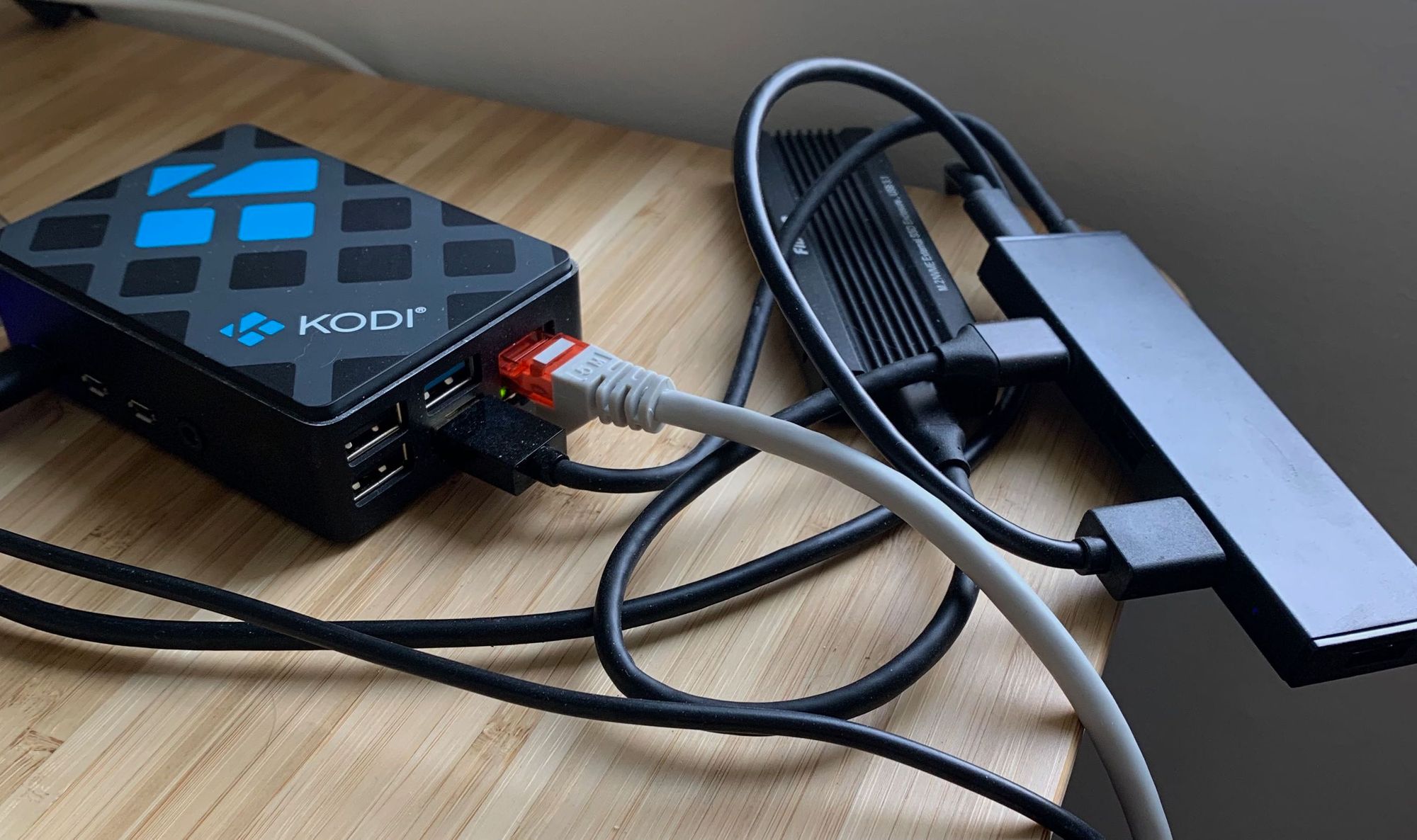
  • Raspberry Pi 4
  • KODI Raspberry Pi 4 Case: Link
  • Fideco M.2 NVME External Enclosure: Link
  • WD Blue SN550 1TB SSD: Link
  • Anker Powered USB hub: Link
Beautiful collection of loose wires

Traditionally I've been a desktop person for doing Serious Work ™ but most jobs have gotten rid of the desktop option. With the lockdown and remote work becoming the new normal, it's unlikely we are ever going back to a desktop lifestyle. However, the benefits for me of a desktop still remain, which are a stable target of hardware that lets me maintain the same virtual terminal for weeks or months, easily expandable storage and enough CPU and memory to let it sit unattended.

While the $75 Raspberry Pi 4 probably doesn't seem like it would fall into that category, it is actually plenty fast for the work I do with the exception of Docker. Writing Terraform, Python and Go is fast and pleasant, the box itself is extremely stable and with the new option to boot off of USB, I have tons of storage space and a drive that is work ready with lots of read/writes for me. While the Raspberry Pi 4 as my headless work machine started as a bit of a lark, it's grown into an incredibly useful tool. There are also a lot of Docker images available for the Raspberry Pi 4 out of the box.

Software

I know there are more options for Raspberry Pi OS than ever before, but I've stuck with Rasbian for a number of years now. A number of other folks swear by Ubuntu, but I've had enough negative experiences that I'm soured on that ecosystem. Raspbian has been plenty stable for development work, mostly getting rebooted for kernel upgrades.

I have no opinion on the merits of Vim vs emacs, I've only ever used Vim and at this point my interest in learning a new text editor is extremely low. Vim works reliably, never seems to introduce anything I would consider to be a shocking change in behavior. I understand that Vim vs NeoVim is really a conversation about community based development vs a single maintainer, but in general I don't really care until I'm forced to care.

If you are interested in learning how to use Vim, there are a ton of great resources. Vim itself has a tutorial but I've never seen newcomers get a lot out of it. For me Vim didn't click until I worked my way through the Vim Bible. In terms of hours saved in my life, working through that book might be one of the best decisions I ever made for my career. Easily thousands of hours saved. If you prefer a more practical tutorial I love Vim Golf.

  • Tmux terminal multiplier

I used Tmux a few hundred times a week and have nothing but good things to say about it. For those who don't know, Tmux allows you to have several terminal windows open and active at the same time, while still allow you to disconnect leaving them running. This means when I start working in the morning, I connect to my existing Tmux session and all of my work is still there. You can do things like run long-running scripts in the background, etc. It's great and you can get started using it here: Tmux tutorial.

  • Environmental variable management with direnv

I might be the last person on earth to discover this. For a long time I've been overloading my ~/.profile with all the different environmental variables needed to do my work. Since I spend a lot of time working with and testing CICD pipeline, serverless applications, etc, environmental variables and their injections are how a lot of application configuration is handled. Direnv is great, letting you dynamically load and unload those values per project by directory, meaning you never need to think if a program isn't working because you accidentally used the same environmental variable twice.

  • Manage my various dotfiles with chezmoi

Chezmoi is an interesting tool and one whose utility is so obvious that I'm shocked nobody made it before now. It's a tool that allows you to manage all of those various configuration files with git, a tool you likely use a hundred times a day anyway. Basically you add dotfiles to a repo with the chezmoi tool, push them to a remote repo and then pull them down again on a new machine or just keep them updated across all your various work devices.

None of this is too amazing if all it did was make a git repo, but it also includes tools like templates to deploy different defaults to different machines as shown here. It also does all the hard work to make secret management as easy as possible, integrating with my favorite password manager 1Password. See how that works here. With Chezmoi the time I spent customizing my configurations to match my workflow exactly is not time wasted when I switch jobs or laptops and I can easily write setup scripts to get a new Raspberry Pi or Raspbian install back to exactly how I want it without having to make something like an Ansible playbook.

I just started using Starship a few weeks ago, and I'm still not sure if I love it. Typically, this sort of stuff annoys me, overwhelming my terminal window with useless information. But I have to say the team behind this tool really nailed it.

Very simple and easy to read

Without any configuration the tool understood my AWS region from my AWS Config file, told me my directory and otherwise got out of my way.

Even reminds me I'm inside of a virtual environment for python!

Inside a Git repo it tracked my git status, Python version for this project and even let me set a fun emoji for Python which definitely isn't required, but I also don't hate. One problem I ran into was not showing emojis by default correctly. I solved this by installing this font and setting it to be my font in iTerm. However, if that doesn't work Starship has more troubleshooting information here.

I use SSH all the time, my keys all have passphrases, but I hate entering them a million times a day. Keychain manages all that for me and is one of the first things I install.

If you write in a language where you want to trigger some action when a file changes, entr will save you from rerunning the same six commands in the terminal a thousand times. I'll use this constantly when writing any compiled language.

Moreutils is a collection of tools that you would think came out of the box. Tools like sponge which write standard input to a file, isutf8 which just checks if a file is utf8 and more. I use sponge on a weekly basis at least and love all these tools.

CLI tool to work with PDFs. I've used this in serious business applications all without issue for years. Lets you combine/modify PDFs in shell scripts.

I work with Git and GitHub all day every day. Hub lets me do more with GitHub, almost everything I would normally do through the web UI through the terminal. While I like GitHub's interface quite a bit, this just saves me time during the day and keeps me from breaking out from my task and get distracted from what I'm doing. For GitLab users this seems to be roughly the same: link

When you work with web applications in Docker, you spend a lot of time curling to see if stuff is working. I use this for healthchecks, metrics endpoints, etc. So imagine my pleasure at discovering a nicer to read curl with httpie. With options like --session= which lets you simulate having a consistent session and --offline to simulate the request without sending it off. I use this tool all the time.

I use man a lot with my command line tools, but sometimes I don't want to get into all the millions of options a tool has and just want some examples of commonly used things. For that, tldr can save me some time and tealdeer is a very nice interface for those pages.

Datamash is one of the weirder tools I use. Basically it allows you to run operations against txt files and sometimes do analysis of those files even if the format is messed up. I'm not exactly sure how it works, but sometimes it really saves me a ton of time with stranger files.

If you work locally with remote APIs, get ngrok. It handles all the tunneling for you, allowing you to simulate basically having a publically available server on your local laptop. It has revolutionized my workflow and I cannot recommend it highly enough.


TIL Command to get memory usage by process in Linux

If like me you are constantly trying to figure out using a combination of ps and free to see what is eating all your memory, check this out:

ps -eo size,pid,user,command --sort -size | \
    awk '{ hr=$1/1024 ; printf("%13.2f Mb ",hr) } { for ( x=4 ; x<=NF ; x++ ) { printf("%s ",$x) } print "" }' |\
    cut -d "" -f2 | cut -d "-" -f1

TIL docker-compose lies to you....

You, like me, might assume that when you write a docker-compose healthcheck, it does something useful with that information. So for instance you might add something like this to your docker-compose file:

healthcheck:
      test: ["CMD", "curl", "-f", "-L", "http://localhost/website.aspx"]
      interval: 5s
      timeout: 10s
      retries: 2
      start_period: 60s

You run your docker container in production and when the container is running but no longer working, your site will go down. Being a reasonable human being you check docker-compose ps to see if docker knows your container is down. Weirdly, docker DOES know that the docker container is unhealthy but seems to do nothing with this information.

Wait, so Docker just records that the container is unhealthy?

Apparently! I have no idea why you would do that or what the purpose of a healthcheck is if not to kill and restart the container. However there is a good solution.

The quick fix to make standalone Docker do what you want

  image: willfarrell/autoheal:latest
  restart: always
  volumes:
    - /var/run/docker.sock:/var/run/docker.sock
  environment:
    - AUTOHEAL_CONTAINER_LABEL=all
    - AUTOHEAL_START_PERIOD=60

This small container will automatically restart unhealthy containers and works great. Huge fan.


GRADO SR80e Headphone Review

The Best Headphones I've Ever Owned

I'm pretty new to the whole audiophile world. It wasn't until I started working in an open office in Chicago that the need for headphones became an obsession. One concept I've run across a lot is the idea of "endgame headphones", which are presumably the last headphones you'll ever need to buy. I don't know if the SR80e's are that, but they're damn close.

Wait, who the hell is Grado?

Don't be embarassed, I also had no idea. As someone who spent years going through Apple headphones, I'm far from an audiophile. It turns our Grado is a fasinating business. They are a US-based family business, based in south Brooklyn and you would have no idea what you were looking at if you drove by.

They've been making the real deal since the 50s and for the audiophile community and started out making phono cartridges for turntables. I strongly recommend reading through their company timeline which they've put on their website in a easy to read scrolling page. You can find that here.

What's not to love about a global HQ like this?

Packaging

The SR80e came in one of the strangest packages for electronics I've ever seen. I bought it from Amazon and got a very nice but extremely flimsy cardboard box with the headphones. It didn't bother me, but I am glad I bought a carrying case. This is the one I ended up with.

This is minimal packaging at its best. You get: Headphones, Warranty, Grado story-sheet, 6.5mm Golden Adapter and that's it. So if you need anything more, make sure you buy it. I recommend a DAC at the very least, which I'll have a review up later about the ones I tried. One surprising thing was the headphones are made in the US, which shocked me at the $99 price point.

Fit and Feel

First impression is these headphones remind me of my dads ancient hifi gear. They feel solid, with a nice weight that is good to pick up but isn't too heavy on the head. The headband adjusts nicely to my head and the cord is remarkably thick, like industrial thick. There is something incredible in this modern age of aluminum and glass to having something that feel retro in a fun way. Throwing it on the scale, it weighs about 235 g without weighing the cord. I found these a lot more comfortable to wear when compared to the AirPods Max I tried around the same time that weigh in at 385 grams.

The best way to describe these headphones is "professional grade". They feel like they could last for years and I have no doubt I could use these daily with no problems. The foam ear cushions are comfortable enough and I love that they are replaceable for when I wear them out in years. There are no bells and whistles here, no mic or anything extra. These are designed to play music.

I love the grill mesh look that lets you see the drivers. The ear cups are fully rotatable and you get the sense that if you needed to break these open and soldier a wire back, you could. The sturdy design philosophy extends to the cable, which clocks in at an extremely long 2m or 7 ft. However Apple designs their incredibly terrible cables, Grado does the opposite with thick cables and durable straight relief at the jack.

Sound Quality

These are some of the best selling headphones in the "beginning audiophile" section of websites and once you start listening to them, you can tell why. I don't "burn in headphones" because I think its junk science, I think you just get used to how they sound which is why people report an "increase in quality". Most of the headphones I've owned have had some sort of "boost" in them, boosting either the bass or the midrange.

It's hard to explain but this makes music sound "correct". There's a smoothness to the sound that reveals layers to music that I have not experienced before.  I've always been suspicious of people who claim they could instantly tell the quality of speakers or headphones with music, mostly because sound feels like a very subjective experience to me. But when relistening to old favorite albums I felt like I was in the studio or listening to them live.

Common Questions about Sound:

  1. Are they good for an open office or shared working space? No, they're open-back headphones which means everyone will hear your music.
  2. Are these good for planes? No, they have no sound isolation or noise cancellation.
  3. What kinds of music sound awesome on these? I love classical music on these headphones along with rock/alternative that has vocals. EDM was less good and I felt I needed more bass to really get into it.

Should I buy them?

I love them and strongly recommend them.


Download Mister Rogers Neighborhood with Python

A dad posted on a forum I frequent in Denmark asking for some help. His child loves Mister Rogers, but he was hoping for a way to download a bunch of episodes that didn't involve streaming them from the website to stick on an iPad. I love simple Python projects like this and so I jumped on the chance. Let me walk you through what I did.

If you just want to download the script you can skip all this and find the full script here.

Step 1: Download Youtube-DL

My first thought was of youtube-dl for the actual downloading and thankfully it worked great. This is one of those insanely useful utilities that I cannot recommend highly enough. You can find the download instructions here: http://ytdl-org.github.io/youtube-dl/download.html

Step 2: Install Python 3

You shouldn't need a super modern version of python. I wrote this with Python 3.7.3, so anything that number or newer should be good. We are using f strings because I love them, so you will need 3.6 or newer.

Download Python here.

I'm checking the version here but only to confirm that you are running Python 3, on the assumption that if you have 3 you have a relatively recent version of 3.

version = platform.python_version_tuple()
if version[0] != "3":
    print("You are not running Python 3. Please check your version.")
    sys.exit(1)

Step 3: Decide where you are going to download the files

I have my download location in the script here:

path = "/mnt/usb/television/mister-rogers-neighborhood/"

However if you just want them to download into the Downloads folder, uncomment the line above this one by removing the # and delete the line I show above. So you'll want path = str(Path.home() / "Downloads") to not have a # in front of it.

Step 4: Run the script

Not sure how to run a Python script? We got you taken care of. Click here for Windows. Here are some Mac tips.

You can find the script on Gitlab here: https://gitlab.com/-/snippets/2100082

Download the script and run it locally. The script checks if it is the first or third Monday of the month and only runs the download if it is. This is to basically keep us from endlessly spamming the servers hosting this great free content.

The first Monday of every month will feature programs from the early years 1968-1975. The third Monday of every month will feature programs from the “Theme Weeks” library 1979-2001.

NOTE: If you just want to download 5 episodes right now, delete these lines:

today = date.today().isocalendar()
if today[2] == 1 and (today[1] == 1 or 3):
    logging.info("There is a new download available.")
else:
    logging.info("There are no new downloads today.")
    sys.exit(0)

Step 5: Set the script to run every day

This script is designed to be run every day and only go out to the servers if there is a new file to get.

Here is how to run a python script every day on Windows.

For Linux and Mac open up your terminal, run crontab -e and enter in the frequency you want to run the script at. Here is a useful site to generate the whole entry.

File Formatting

Here is the metadata formatting I followed for the Infuse iOS app, my favorite app. You may want a different format for the filename depending on your application.

Questions?

If people actually use this script I'll rewrite it to use celery beat to handle the scheduling of the downloads, but for my own use case I'm comfortable writing cron jobs. However if you run into issues running this, either add a comment on the GitLab link or shoot me an email: mat at matduggan.com.


Free DS-82 Fillable PDF Download

While working on my passport renewal, I realized the US Government official PDF isn't set up as a form. I googled it and it seemed like nobody had made one of these available for free that I could find. Just a lot of spammy websites trying to get you to pay or make an account to access the form. Anyway, for those of you looking for just a simple PDF download of the form with all the fields set up correctly:

US Government DS-82 Fillable PDF


Stuff To Buy: American Expat Edition

One of the more common questions I hear get thrown around expat groups is "what should I buy before I move" or "what should I send to a loved one who is currently living in Europe". While I am not an expert on what is available everywhere in Europe, here are some things I miss in Denmark and likely are hard for most expats in Europe to get. Hopefully this helps you pack or buy some great gifts.

  • American Plastic Food Wrap - Denmark has this stuff, but the domestic stuff is terrible compared to the American version. I have no idea why, I assume some sort of super dangerous chemical. Anyway buy it.
  • Taco Seasoning - I have no idea why, but the stuff they have here is terrible. It has almost no flavor except for salt.
  • Twizzlers - If you like them, buy them because you can't buy these in Denmark.
  • Poultry Seasoning - mostly for Thanksgiving but you can't buy that here.
  • Cream Of Tartar
  • Good Doritos - they have some Doritos but they don't have any of the good flavors, so no cooler ranch or nacho cheese.
  • Everything Bagel Seasoning - honestly there aren't a lot of bagel places, but this seasoning goes great with everything
  • Aspirin
  • Pepto-Bismol
  • Tums
  • Melatonin
  • Corn bread
  • Grits / pancake mix - you can find it but it costs 5x what it should
  • Maple Syrup is available but only the expensive real stuff
  • Old Bay
  • Peppers! Spicy food doesn't exist in Europe like it does in the US. The only stuff you can get here is like tobasco sauce and red pepper flakes. So get some guajillos, puyas, chiles de árbol with the stems if you can find them.
  • The best hot sauce on the planet.
  • Greenies for your dog.
  • Cheap Dog Poop Bags
  • Mac and Cheese Powder - no Kraft Mac and Cheese here.
  • Electronics - all electronics because the tax for things like laptops/headphones/game consoles is insane in Europe compared to the US
  • Peanut Butter - you can buy it but it is a lot more expensive
  • Meatloaf Mix
  • Vanilla Extract - lots of vanilla beans at the grocery stores but no extract
  • Sprinkles
  • Pretzels
  • Goldfish crackers
  • Ginger Ale (they have ginger beer)
  • Root Beer